SAP SD item category versus schedule-line category: Understand the control split
A manufacturer's sales item has an expected logistics role, but its schedule-line behavior does not match the team's assumption.

Source review:
START HERE · NO PRIOR TOPIC KNOWLEDGE NEEDED
What it is. Why it matters.
An item category controls aspects of a sales-document item. A schedule-line category controls relevant dated quantity and logistics behavior beneath that item.
Completely new to SAP?
Manufacturers use SAP to connect work such as buying components, recording inventory, planning production, shipping equipment and accounting for costs. SAP S/4HANA is an enterprise resource planning system: it connects these activities through shared business data.
Sales and Distribution connects customer orders, logistics and billing. Each stage has its own documents, quantities and status, so one stage’s success does not prove the whole sale is complete.
A transaction code, or t-code, is a shortcut to a task in classic SAP GUI. Fiori apps provide another way to work. Names and screens depend on the product and release; you do not need a live system to learn the concepts in this guide.

Scope and source-review notes
Scope and evidence
Source review by FAST SAP SOLUTIONS® editorial. This badge describes our editorial review; it does not represent SAP certification or independent endorsement.
Classic SD sales-item and schedule-line concepts for SD consultants and support. S/4HANA sales documentation supports the main example; ERP VOV6/VOV7 references identify classic configuration contexts. Public-cloud determination and configuration capabilities require their own edition documentation.
Documentation review on 14 November 2026 used the available official SAP indexed excerpts; several SAP Help pages returned no readable full text. The worked case and proposed checks are original illustrative teaching material, not execution evidence from a customer SAP system. Exact fields, permitted actions and behavior must be confirmed against the installed product, release and configuration.
A MANUFACTURING EXAMPLE
Explain supply behavior on an equipment order
Find the first control divergence
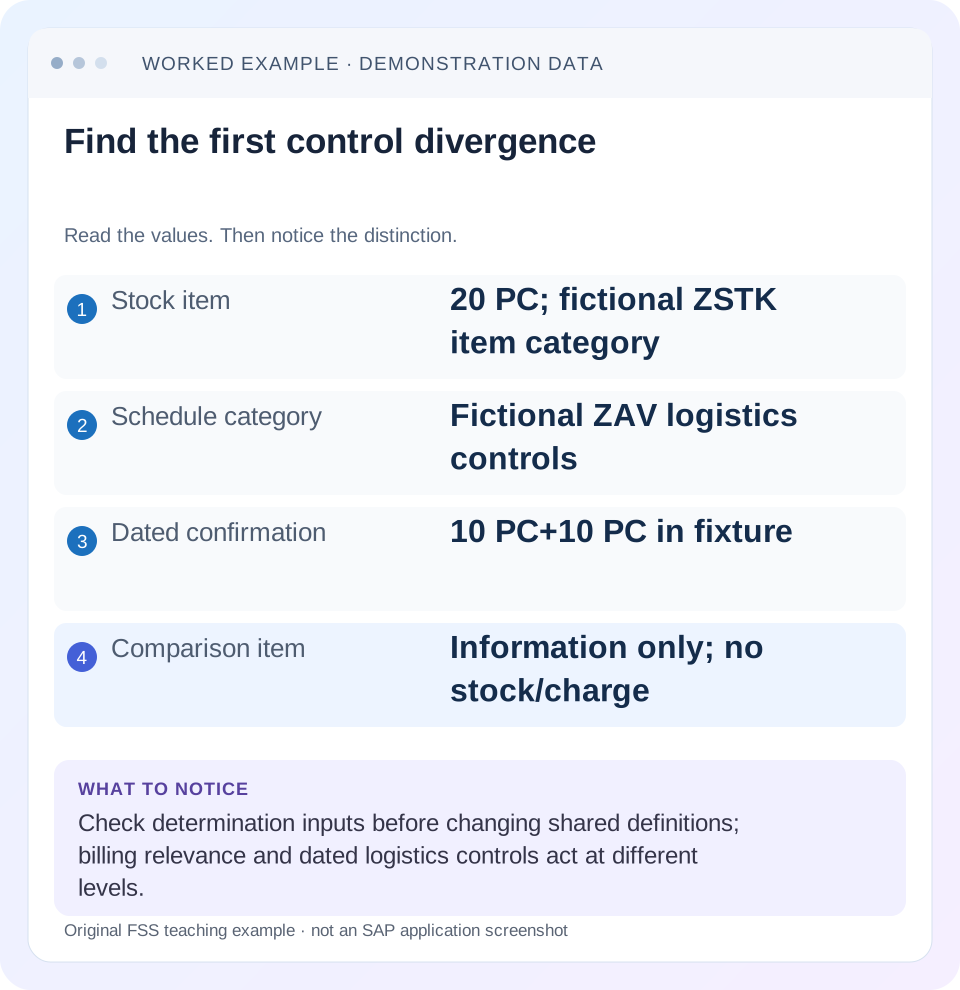
Read the example values
- Stock item
- 20 PC; fictional ZSTK item category
- Schedule category
- Fictional ZAV logistics controls
- Dated confirmation
- 10 PC+10 PC in fixture
- Comparison item
- Information only; no stock/charge
Words you’ll meet in this guide
- Sales order
- A record of a customer’s order.
- Delivery
- A document organizing goods to be sent.
- Billing
- The process that creates a customer charge.
- MRP
- Material requirements planning: comparing demand with supply to propose what is needed.
Preview the practical steps
SEE THE CONNECTION
See it in a simple example.
A small example to make the idea concrete.
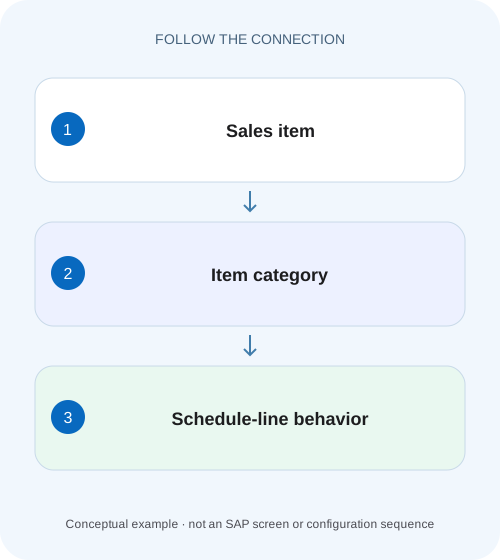
Explain supply behavior on an equipment order
A manufacturer's sales item has an expected logistics role, but its schedule-line behavior does not match the team's assumption.
Two categories control two related levels
The item category describes processing rules for a sales-document item.
Audience and prerequisites
This tutorial is for SD configuration owners and support analysts with permitted order, material and configuration display.
Mechanism: determine the item, then its schedule context
SAP describes item-category determination using sales document type, material/item category group, item usage and higher-level item context.
Explain supply behavior on an equipment order
A manufacturer's sales item has an expected logistics role, but its schedule-line behavior does not match the team's assumption.
Read item-category and schedule-line controls separately before attributing the result to stock alone.
| Reader | Business question | Evidence to carry forward |
|---|---|---|
| Equipment and component sales, dispatch and customer-service teams | Explain supply behavior on an equipment order | Read item-category and schedule-line controls separately before attributing the result to stock alone. |
01 Two categories control two related levels
The item category describes processing rules for a sales-document item. The schedule-line category controls relevant dated quantity and logistics behavior below that item. A correct item category does not establish that its schedule lines transfer requirements, check availability or behave as intended for delivery.
SAP documents schedule lines as date/quantity subdivisions and describes their control of requirements, availability and goods movements. Item-level billing relevance is a separate setting. Diagnose the symptom's level first: missing billing relevance and missing supply requirements are different questions even when they appear on the same order item. [1] [3]
02 Audience and prerequisites
This tutorial is for SD configuration owners and support analysts with permitted order, material and configuration display. Obtain sales document type, item category, relevant material inputs, schedule-line category, quantity/date and attempted next action. Begin with the categories actually present in the document, rather than the names expected from a design slide.
The worked case concerns a conventional stock-sales process with an information-only comparison item. Returns, third-party procurement, product substitution and scheduling agreements can use different controls. VOV6 and VOV7 are classic configuration contexts where supported; they are not universal Public Edition maintenance routes. Customer category names here are fictional teaching labels. [4]
03 Mechanism: determine the item, then its schedule context
SAP describes item-category determination using sales document type, material/item category group, item usage and higher-level item context. Those inputs can explain why two visually similar lines receive different processing. A subitem can legitimately differ from its main item even when its material description looks familiar. [2]
Schedule-line-category determination then uses the relevant item category and material MRP type in the documented classic design. This creates two diagnostic stages: was the intended item category selected, and was the intended schedule-line category selected for that item/material context? A valid category definition cannot fix wrong determination inputs by itself. [1]
04 Worked case: item 10 should consume supply
In our fictional order 47000123, item 10 is 20 PC of stocked material STOCK_A. The intended training design uses item category ZSTK and a schedule category ZAV that transfers the relevant requirements, checks availability and supports the intended delivery process. Ten PC are confirmed for 20 November and ten for 24 November.
Item 20 is an information-only comparison line with no intended stock movement or customer charge. Its category design differs deliberately. These labels and settings are illustrative, not SAP-delivered defaults. The problem report says item 10 unexpectedly behaves like an information line, while its visible quantity and description look correct.
| Line | Item role | Schedule/logistics role |
|---|---|---|
| Item 10 STOCK_A | Stock sales item ZSTK | ZAV; 20 PC with dated confirmations |
| Item 20 information | No intended charge | No intended stock demand/movement |
| Billing symptom | Inspect item relevance/source basis | Schedule controls do not define price alone |
| Supply symptom | Confirm item classification first | Inspect requirements/checking behavior |
05 Inspect the actual determined values
Display item 10's actual item category and each relevant schedule-line category. Record material, plant, MRP type in the relevant material context, and whether there is a higher-level item or usage condition. Compare those values with the intended training design and a working equivalent item.
If item 10 has the information-only item category, investigate the item-category inputs and assignment. If ZSTK is correct but its schedule category differs, investigate that second determination stage. If both categories match, inspect their actual settings and other requirements/checking configuration. This sequence prevents a shared category from being changed to compensate for a misclassified individual item.
06 Separate definition from determination
A category definition says what that category does. Determination says which category a document receives. Changing the definition affects other users of the category, while correcting an input or determination assignment addresses which items use it. Treat those as different change scopes.
For STOCK_A, suppose its item category group is wrong in the relevant master-data context. The intended assignment can work perfectly for the wrong group and still give an undesired result. Correcting the product classification through the approved process is different from modifying every order type's category rule. Inspect existing documents separately; a master change does not automatically prove old documents redetermined.
07 Read item-level billing control for a billing symptom
If the problem is that item 10 never contributes to billing, inspect its billing relevance and actual process basis. SAP identifies Billing Relevance in the classic item-category configuration context. An order-related and delivery-related item can require different source documents and statuses. [3]
Do not enable schedule-line availability simply to repair a billing-due-list issue. Likewise, changing item billing relevance cannot create a missing supply confirmation. Follow the actual document chain: item category, source basis, relevant quantity and existing billing. The desired result is the correct charge from the correct reference, not merely a row appearing in a billing list.
08 Read schedule-line controls for requirements and availability
Inspect the documented schedule-category controls for requirements transfer, availability and delivery relevance in the installed process. SAP illustrates different standard categories with different combinations. Those examples teach that these functions are intentionally separable; a line with a quantity is not automatically a demand signal or a deliverable requirement. [1]
For the fixture, item 10's 20 PC should have the intended requirements/confirmation behavior under ZAV. If it receives an information-only schedule category, confirm why before changing switches. Also review the wider checking and requirements design where relevant. One checkbox is not a universal repair for all ATP or planning discrepancies.
09 Distinguish category permission from an actual confirmation
A category can permit availability checking while the actual result confirms only part of the demand. The 10/10 split in the fixture expresses two dated quantities, not proof that the category is wrong. Review available supply and checking scope to explain the confirmation result.
Similarly, delivery relevance establishes a processing role, not proof that a delivery has been created or goods issue posted. Follow open quantity, dates, blocks and logistics assignments. A category diagnosis should end with the specific mechanism it explains and the additional independent states still needed for fulfillment.
10 Review goods movement direction in special processes
SAP's schedule-line documentation distinguishes sales goods issue from goods receipt in a returns context. That is why copying a normal-sales schedule category into a returns scenario without reviewing the supported design can misrepresent the logistics event. The business process determines the intended direction and stock treatment. [1]
Do not infer a movement type from the category's name or borrow one from another localization or stock-transfer guide. Inspect the actual configured relationship and installed process documentation. The same discipline applies to third-party or individual-procurement lines: their purchasing and scheduling dependencies need their own supported control design.
11 Use a focused comparison worksheet
For a working and failing item, record document type, material group inputs, usage/higher item, determined item category, MRP type, schedule category and observed effect. Keep expected behavior alongside the actual value. Compare one meaningful input difference at a time.
For item 10, the decisive difference may be an incorrect item category group, a different MRP type or a manual category permitted in the document. If all inputs/settings agree but behavior differs, investigate document history and the actual execution path rather than creating a duplicate category. A worksheet that identifies the first divergence is more useful than a screenshot of both configuration screens.
| Boundary | Values to compare |
|---|---|
| Item determination | Document type, group, usage, higher item |
| Item definition | Billing relevance and intended item processing |
| Schedule determination | Actual item category and material MRP type |
| Schedule definition | Requirements, availability, delivery/goods movement |
| Runtime result | Dated confirmations and actual follow-on documents |
12 Plan an authorized correction and regression scope
When changing determination or a shared definition, identify every process that uses it. A change intended for one stock-order type can affect returns, free-of-charge items or subitems if they share the category. Use development/quality transport and test controls appropriate to the change.
The positive fixture should restore item 10's intended requirements and dated confirmation behavior. The negative fixture should leave item 20 information-only without unintended stock demand or billing. A boundary fixture should exercise a legitimate alternate MRP or higher-level-item context. Check actual determined categories after creation or supported redetermination; do not assume a configuration import rewrote every existing document.
13 Verify quantities and downstream evidence
In a controlled training case, confirm the order remains 20 PC and the illustrated schedule confirmation totals 10 plus 10 =20 PC. Verify the relevant demand/planning evidence using the supported process and then the intended delivery basis. If delivery is created for the first 10 PC, retain the remaining 10-PC requirement with its later date.
For billing verification, use the intended source and pricing assumptions separately. An information-only item should not acquire a charge merely because a stock item was corrected. Compare source item identities as well as totals, since a 20-PC total can still come from the wrong item or wrong category path. Record the actual observed results, not just the intended switch settings.
To test the determination boundary without changing shared definitions, use a paper pair with the same order type, item usage and higher-level context but a different documented material category group. Predict which item category each assignment selects, then apply the schedule determination using its MRP type. If the predicted path diverges before the schedule line, changing ZAV cannot repair the original classification. This exercise teaches the order of decisions rather than memorizing category codes.
14 Questions and a useful configuration handoff
Is item category the same as schedule-line category? No; they act at related but different levels. Does an availability-enabled category guarantee full quantity today? No; inspect the actual result. Should I change a shared category to repair one order? First establish whether the determination inputs and actual category are correct.
A useful handoff names order/item, actual categories, determining inputs, failed business effect and first divergence from a working equivalent. For the fixture: “Item 10 should use ZSTK/ZAV; inspect actual group and MRP-type combination; 20-PC request with two 10-PC dates expected under training supply assumptions.” That separates classification, configuration and supply-result questions so the correction can be tested coherently.
Related services and next steps
Primary sources
Found this useful?
Share this guide with your network, or leave a like.
Your like is saved in this browser.