SAP sales-order quantity versus confirmed quantity: Read the schedule lines
A manufacturer has an order for 100 units but can confirm only part on the first requested date.

Source review:
START HERE · NO PRIOR TOPIC KNOWLEDGE NEEDED
What it is. Why it matters.
A schedule line holds dated sales quantities. Requested quantity expresses what the customer wants, while confirmed quantity reflects the supported promise for a date.
Completely new to SAP?
Manufacturers use SAP to connect work such as buying components, recording inventory, planning production, shipping equipment and accounting for costs. SAP S/4HANA is an enterprise resource planning system: it connects these activities through shared business data.
Sales and Distribution connects customer orders, logistics and billing. Each stage has its own documents, quantities and status, so one stage’s success does not prove the whole sale is complete.
A transaction code, or t-code, is a shortcut to a task in classic SAP GUI. Fiori apps provide another way to work. Names and screens depend on the product and release; you do not need a live system to learn the concepts in this guide.

Scope and source-review notes
Scope and evidence
Source review by FAST SAP SOLUTIONS® editorial. This badge describes our editorial review; it does not represent SAP certification or independent endorsement.
SD schedule-line and fixed quantity/date concepts for sales operations and planning support, using S/4HANA on-premise documentation. Classic ATP,aATP,backorder processing and individual procurement have distinct configured behavior; the tutorial does not prescribe confirmation overrides.
Documentation review on 14 November 2026 used the available official SAP indexed excerpts; several SAP Help pages returned no readable full text. The worked case and proposed checks are original illustrative teaching material, not execution evidence from a customer SAP system. Exact fields, permitted actions and behavior must be confirmed against the installed product, release and configuration.
A MANUFACTURING EXAMPLE
Communicate the equipment supply split
Keep demand, dates and delivery distinct
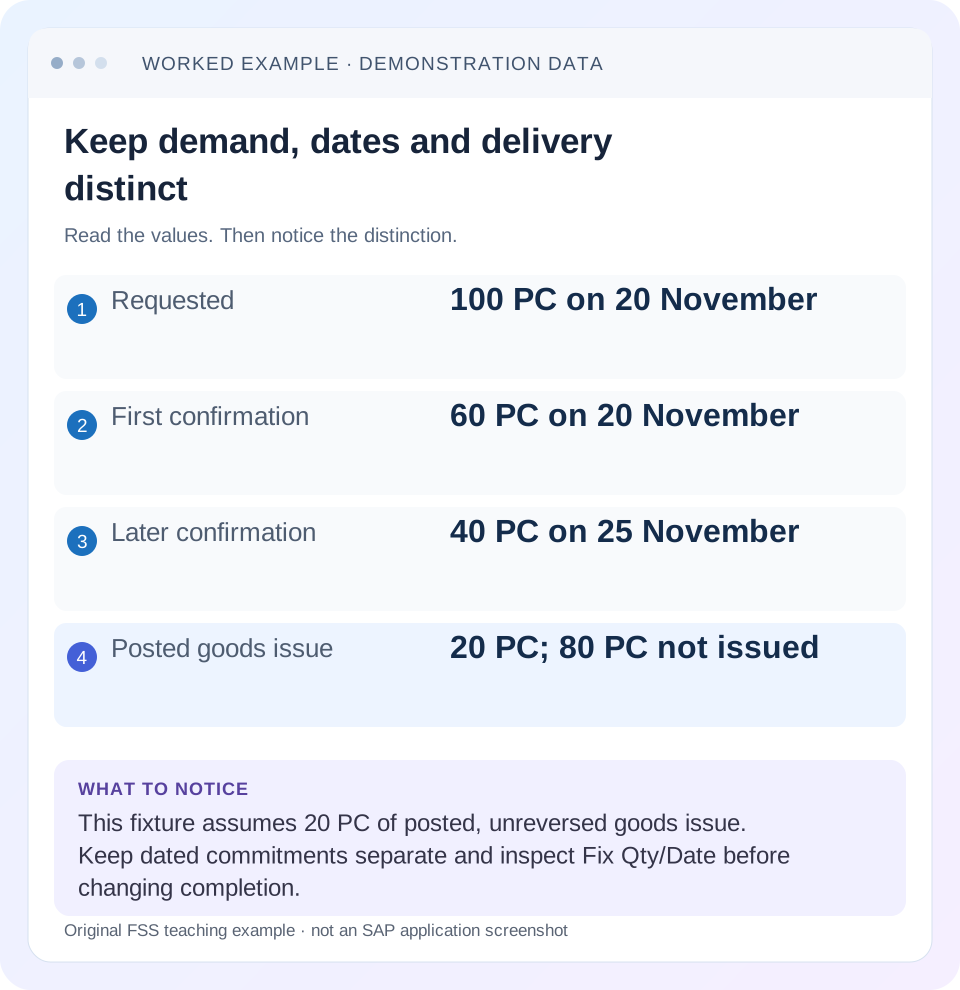
Read the example values
- Requested
- 100 PC on 20 November
- First confirmation
- 60 PC on 20 November
- Later confirmation
- 40 PC on 25 November
- Posted goods issue
- 20 PC; 80 PC not issued
Words you’ll meet in this guide
- Sales order
- A record of a customer’s order.
- Delivery
- A document organizing goods to be sent.
- Billing
- The process that creates a customer charge.
- HANA
- SAP’s database platform.
Preview the practical steps
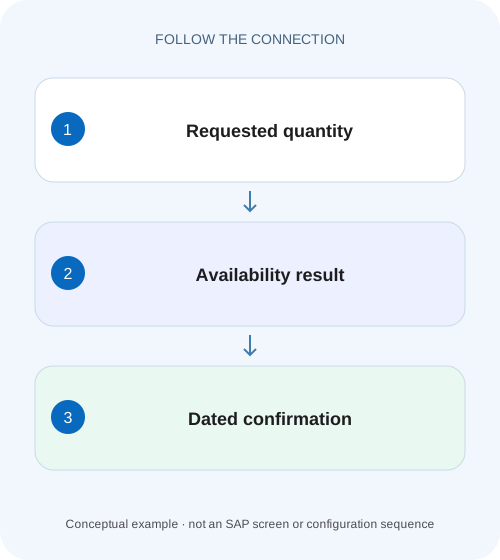
SEE THE CONNECTION
See it in a simple example.
A small example to make the idea concrete.
Communicate the equipment supply split
A manufacturer has an order for 100 units but can confirm only part on the first requested date.
The order quantity is demand, not a promise for one date
Read requested quantity and dated confirmed quantity separately.
Audience and prerequisites
This tutorial is for sales operations, SD support and planning/procurement owners.
Worked order: 100 requested, 60 now, 40 later
Our fictional order 47000123/10 requests 100 PC for 20 November.
Communicate the equipment supply split
A manufacturer has an order for 100 units but can confirm only part on the first requested date.
Read the dated schedule lines and delivery agreement before promising the order total for one shipment date.
| Reader | Business question | Evidence to carry forward |
|---|---|---|
| Equipment and component sales, dispatch and customer-service teams | Communicate the equipment supply split | Read the dated schedule lines and delivery agreement before promising the order total for one shipment date. |
01 The order quantity is demand, not a promise for one date
Read requested quantity and dated confirmed quantity separately. A 100-PC order with 60 PC confirmed for 20 November does not promise all 100 PC on that date. Later confirmations, unconfirmed balance and delivery agreements determine the complete fulfillment picture.
SAP documents availability outcomes that create later schedule lines and the Fix Qty/Date field for recording acceptance of a proposal in the relevant process. That field has planning and completion implications. Do not use it merely to make an order look finished; establish the customer's actual accepted quantity/date outcome and the installed process behavior. [1]
02 Audience and prerequisites
This tutorial is for sales operations, SD support and planning/procurement owners. Obtain order/item, requested quantity/date, each relevant schedule line and confirmation, units, partial/complete-delivery agreements and existing document flow. Use display first and an approved training fixture for any scheduling experiment.
The cited concepts are from S/4HANA on-premise sales documentation. The exact availability screen, ATP/aATP algorithms, rescheduling and backorder capabilities vary by release and setup. An individual-procurement item can be driven by purchasing events rather than a simple stock check. Do not assume one stock-item example describes every schedule category or aATP feature.
03 Worked order: 100 requested, 60 now, 40 later
Our fictional order 47000123/10 requests 100 PC for 20 November. The current result confirms 60 PC for 20 November and 40 PC for 25 November. The total confirmed is 100 PC, but only 60 PC belongs to the first date. The customer agreement determines whether that split is acceptable.
At EUR 20 net per PC, the requested simple net value is EUR 2,000 before tax. The first-date 60 PC corresponds to EUR 1,200 and the later 40 PC to EUR 800 under the unchanged-price assumption. These values help communicate scope; they do not make either quantity physically delivered or already billed.
| Measure | Quantity | Date/context |
|---|---|---|
| Customer request | 100 PC | 20 November |
| First confirmation | 60 PC | 20 November |
| Later confirmation | 40 PC | 25 November |
| First-tranche quantity with posted goods issue | 20 PC | Delivery 80000123; goods issue posted and unreversed |
| Confirmed quantity not yet goods issued in this worksheet | 80 PC | 40 first tranche + 40 later; illustrative reconciliation |
04 Interpret schedule-line rows by their field meaning
Inspect the requested and confirmed fields and dates actually shown for the item. Depending on the process, a requested row and confirmed rows can represent different measures of the same demand. Do not add a 100-PC requested quantity to 60 and 40 confirmed and report 200 PC of demand.
Preserve schedule-line identity and the business meaning of each column in any export. If an analytical extract repeats the item order quantity on every row, summing that column can also overstate demand. For the fixture, the correct requested total remains 100 PC and confirmed total is 60+40=100 PC with separate dates. Row count is not a quantity calculation.
05 Separate delivery date from earlier logistics dates
A customer arrival date, material availability date, transportation planning date and goods-issue date are different scheduling concepts. Read the actual date label before telling the customer that a quantity can arrive or leave on that day. Delivery creation can need to begin earlier to meet the agreed arrival. [3]
For the fixture, the 20/25-November labels describe the illustrative confirmation dates being discussed. A real support record should retain the actual date type and relevant logistics dates. If the due list excludes the item, compare its selected creation/scheduling date rather than automatically changing the requested customer date. The linked selection lesson develops that separate investigation.
06 Reconcile delivered quantity without losing date context
Suppose delivery 80000123 for this exact source order/item has posted goods issue for 20 PC from the first 60-PC quantity, with no goods-issue reversal or other quantity change in this fixture. The simple confirmed quantity not yet goods issued is 40 PC from that first tranche plus 40 PC later, or 80 PC overall. Here, delivered means goods issued; it does not establish customer receipt. The order request is still 100 PC; execution progress is another measure.
Use actual document flow and open-quantity/status evidence, especially when deliveries are canceled, rejected or changed. A created delivery is not necessarily goods issued, and goods issue is not necessarily billing. For the worked balance, do not subtract an unrelated 20-PC delivery for another item merely because its number matches. Source/item identity and posted, unreversed goods issue come before this arithmetic.
07 Read the customer’s partial-delivery agreement
A 60/40 schedule can be technically produced while the customer requires complete delivery. Conversely, a customer can accept partial delivery of 60 now and 40 later. Inspect the actual order agreement and the configured process rather than interpreting every partial confirmation as permission to ship partially.
For a complete-delivery fixture, the practical next step may be reviewing the date at which the full requirement can be fulfilled. It is not automatically editing the order quantity to 60. For a partial-delivery fixture, communicate the accepted dates and quantities clearly and retain the remaining 40-PC requirement. The customer decision and availability result should be visible as separate evidence.
08 Understand Fix Qty/Date as a business choice
SAP's documented fixed quantity/date behavior records acceptance of the schedule-line proposal. The documentation describes consequences for requirements, rescheduling and when a fixed item is considered complete. Those consequences are why the indicator should follow an intentional customer/process decision. [1]
Consider a separate boundary fixture:100 PC requested, only 60 PC confirmed in total and no later quantity confirmed. The cited classic guidance says a fixed item can be complete after its entire confirmed quantity is delivered even when that is below the original request. Therefore, fixing a 60-PC proposal can change how the remaining 40-PC demand is treated. Inspect the applicable process before choosing that state. [1]
09 Do not fix zero as a cosmetic cleanup
The same SAP guidance explicitly discusses the zero-confirmation boundary: fixing zero can make an item considered complete from the start in the documented design. That is not a method for obtaining supply. If the customer still wants 100 PC, the support question remains how the requirement will be planned and fulfilled. [1]
Use a paper fixture to compare blank versus fixed state and document the intended business meaning. Do not toggle the field in production to see what disappears. For modern ATP/aATP or external planning integration, review the installed feature's treatment of fixed confirmations and subsequent processing rather than extrapolating every classic detail unqualified.
10 Investigate individual procurement through purchasing references
SAP documents scheduling for individual-procurement items using purchasing processing time, planned delivery time, goods-receipt processing time and plant calendar context. It also describes schedule updates from configured procurement events. A purchase-order delivery date therefore may not equal the customer's confirmed arrival date directly. [2]
For a training item whose supplier receipt is planned 23 November, additional receiving and shipping time can explain a later customer date. Use actual working/calendar-day definitions and configuration to calculate it; do not invent a universal two-day offset. Trace the related purchasing reference and relevant confirmation event when dates change. A stock-only availability explanation can miss the real dependency.
11 Troubleshoot the quantity or date that first diverges
If total confirmation is below request, inspect availability/procurement and any fixed-proposal decision. If total confirmation matches but the first date is short, inspect the dated split. If confirmed quantity exists but no delivery appears, inspect due-list dates, blocks and logistics prerequisites. If delivered quantity seems too high, check source items, units and reversal relationships.
If dates change after procurement or a supported recheck, compare the event timing and input changes. If the document appears complete with less delivered than originally ordered, inspect fixed quantity/date and completion agreements. Do not change a schedule category merely because one confirmation result is smaller than demand; first establish whether the category and checking design are actually wrong.
| Observation | Next evidence |
|---|---|
| 100 total,60 first date | Dated split and customer agreement |
| Only 60 total confirmed | Supply/procurement and fixed-proposal decision |
| Less than order delivered but complete | Fix Qty/Date and completion agreements |
| Confirmation exists, no delivery | Due dates, blocks and logistics |
| Procurement date changed | Related event, calendar and scheduling inputs |
12 Build a practical quantity worksheet
Create separate columns for requested quantity, date type, confirmed quantity/date, delivery reference, posted goods-issue quantity and the actual SAP open-quantity/status observation. For order 47000123/10, write 100 requested, 60 first-date confirmed, 40 later confirmed and 20 PC with posted, unreversed goods issue in delivery 80000123. Record units on each measure and show the remaining 40+40=80 calculation. This worksheet reconciles the stated fictional quantities; it is not a universal SAP open-quantity algorithm. Actual open quantity and completion depend on the relevant document/status fields and configured process.
If the order uses 10 BOX with 1 BOX=10 PC, normalize before comparison:10 BOX=100 PC and 6 BOX=60 PC. Do not compare raw 10 with 60 and conclude that confirmation exceeds the request sixfold. Keep the approved conversion and original units so another analyst can reproduce the result without losing the order's commercial unit.
Requested = 100 PC
Confirmed = 60 PC + 40 PC = 100 PC
Posted, unreversed goods issue in fixture = 20 PC from first tranche
Confirmed quantity not yet goods issued in worksheet = (60 − 20) + 40 = 80 PC
If 1 BOX = 10 PC: 10 BOX = 100 PC; 6 BOX = 60 PC
Read actual SAP open-quantity/status fields separately for the configured process.
Do not calculate requested + confirmed as total demand.
13 Verify positive, negative and boundary outcomes
The positive exercise reconciles 100 requested to 60+40 confirmed, then 20 PC with posted, unreversed goods issue to 80 confirmed PC not yet goods issued under the stated fixture. The negative exercise sums requested plus confirmed and should be rejected as double counting. A boundary exercise provides only 60 total confirmed and asks what fixing that proposal means for the original 40-PC gap under the documented process.
Another boundary uses zero confirmation: the learner should identify the completion implication rather than label it fulfilled. An individual-procurement variation requires tracing the purchasing event and calendar before explaining a date. In an authorized training system, inspect actual schedule and document states after a supported change; the figures here remain illustrative expected results.
When preserving schedule evidence, include the observation time and whether the result precedes or follows a supported recheck or procurement event. A customer email from yesterday can describe a different confirmation from the current order display. Compare those versions before calling either one wrong. The operational task is then to establish the latest approved commitment and communicate the change, not to overwrite the current schedule merely to match an older screenshot.
14 Questions and a useful fulfillment statement
Does 100 ordered mean 100 can ship today? Read the dated confirmations. Does 100 total confirmed mean one delivery? The dates, agreements and logistics criteria still matter. Does fixing quantities create stock? No; it records a decision with processing consequences. Does a supplier date prove customer arrival? Procurement and shipping scheduling remain separate.
A useful statement says: “Order 47000123/10 requests 100 PC for 20 November; 60 confirmed first date, 40 on 25 November. Delivery 80000123 has posted, unreversed goods issue for 20 PC; this fictional worksheet leaves 80 confirmed PC not yet goods issued. Actual SAP open-quantity/status evidence, partial-delivery acceptance and Fix Qty/Date state recorded.” That gives sales, planning and shipping a common quantity/date picture without turning demand into an unsupported promise.
Related services and next steps
Primary sources
Found this useful?
Share this guide with your network, or leave a like.
Your like is saved in this browser.