Sold-to, ship-to, bill-to and payer: Read SAP sales partner roles correctly
A customer's head office orders equipment for another operating site, while a separate organization receives and pays the invoice.

Source review:
START HERE · NO PRIOR TOPIC KNOWLEDGE NEEDED
What it is. Why it matters.
Partner functions describe who plays each role in a sale: ordering, receiving goods, receiving the bill and paying. One organization may fill several roles, or different organizations may fill each.
Completely new to SAP?
Manufacturers use SAP to connect work such as buying components, recording inventory, planning production, shipping equipment and accounting for costs. SAP S/4HANA is an enterprise resource planning system: it connects these activities through shared business data.
Sales and Distribution connects customer orders, logistics and billing. Each stage has its own documents, quantities and status, so one stage’s success does not prove the whole sale is complete.
A transaction code, or t-code, is a shortcut to a task in classic SAP GUI. Fiori apps provide another way to work. Names and screens depend on the product and release; you do not need a live system to learn the concepts in this guide.

Scope and source-review notes
Scope and evidence
Source review by FAST SAP SOLUTIONS® editorial. This badge describes our editorial review; it does not represent SAP certification or independent endorsement.
SD partner-function concepts for sales operations, master-data and integration support. ERP and S/4HANA documentation supports roles and determination; BP roles, multiple-address handling and document overrides vary by edition, release and configuration.
Documentation review on 14 November 2026 used the available official SAP indexed excerpts; several SAP Help pages returned no readable full text. The worked case and proposed checks are original illustrative teaching material, not execution evidence from a customer SAP system. Exact fields, permitted actions and behavior must be confirmed against the installed product, release and configuration.
A MANUFACTURING EXAMPLE
Read the customer's equipment delivery roles
One sale can involve four parties
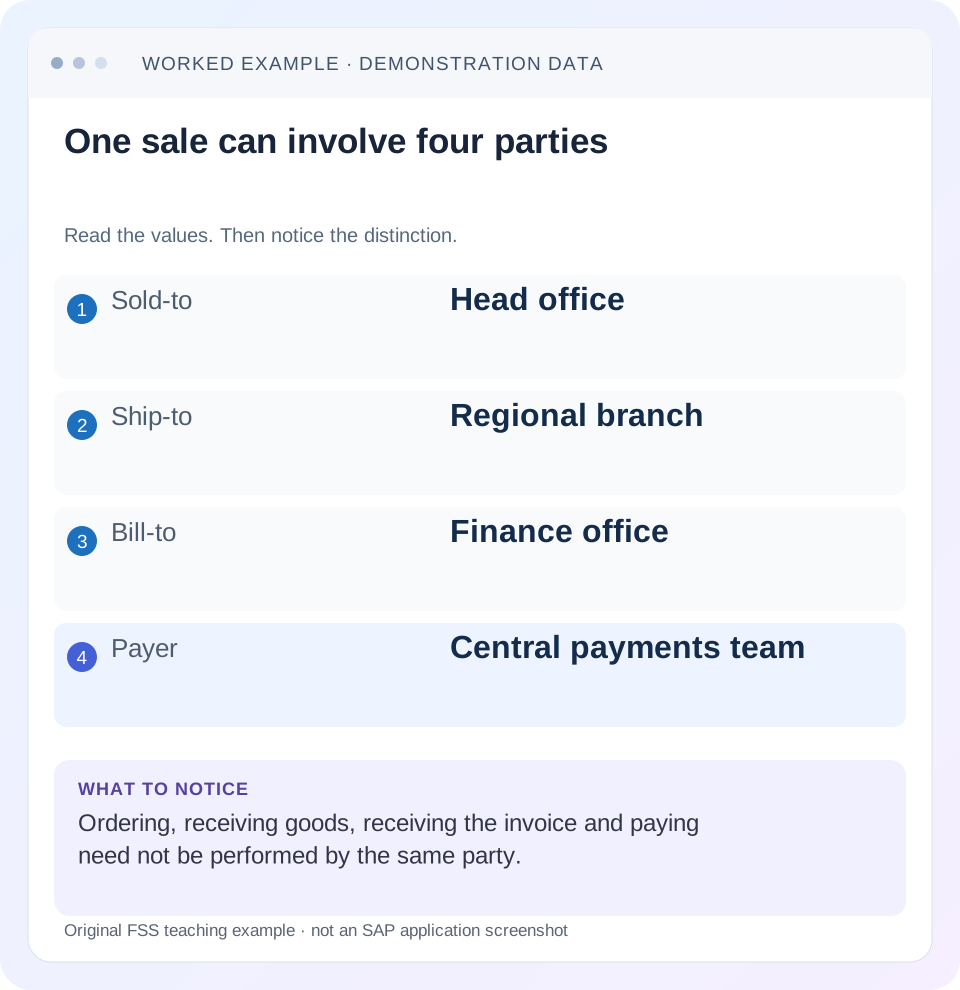
Read the example values
- Sold-to
- Head office
- Ship-to
- Regional branch
- Bill-to
- Finance office
- Payer
- Central payments team
Words you’ll meet in this guide
- Sales order
- A record of a customer’s order.
- Delivery
- A document organizing goods to be sent.
- Billing
- The process that creates a customer charge.
- HANA
- SAP’s database platform.
- API
- A defined interface through which programs exchange data or request actions.
Preview the practical steps
SEE THE CONNECTION
See it in a simple example.
A small example to make the idea concrete.
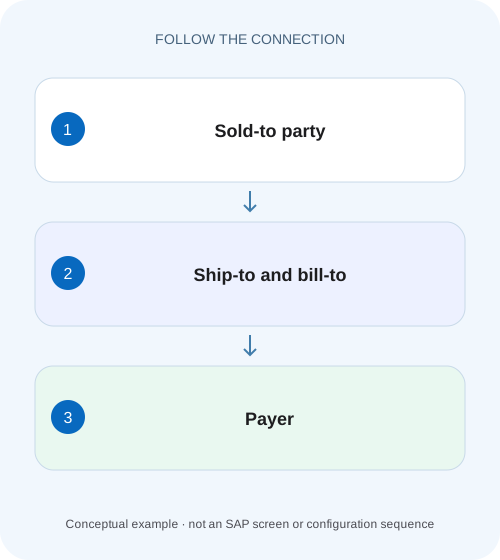
Read the customer's equipment delivery roles
A customer's head office orders equipment for another operating site, while a separate organization receives and pays the invoice.
The four partner functions answer four different questions
The sold-to places the order, the ship-to receives the goods, the bill-to receives the invoice and the payer settles it.
Audience and prerequisites
This guide is for sales operations, SD support, master-data owners and integration analysts.
Worked sale: head office orders for a branch
In our fictional order 47000123, sold-to C100 is Central Purchasing, ship-to C210 is the North Branch, bill-to C310 is the Finance Office and payer C410 is Central Payments.
Read the customer's equipment delivery roles
A customer's head office orders equipment for another operating site, while a separate organization receives and pays the invoice.
Check the actual sold-to, ship-to, bill-to and payer roles before treating one address as the whole commercial relationship.
| Reader | Business question | Evidence to carry forward |
|---|---|---|
| Equipment and component sales, dispatch and customer-service teams | Read the customer's equipment delivery roles | Check the actual sold-to, ship-to, bill-to and payer roles before treating one address as the whole commercial relationship. |
01 The four partner functions answer four different questions
The sold-to places the order, the ship-to receives the goods, the bill-to receives the invoice and the payer settles it. One customer can perform all four functions, but a sales process can also assign them to different parties. Read the actual document's assignments rather than treating its prominent customer name as the answer to every question. [5]
SAP distinguishes partner function from partner type and permits one partner to perform several functions. The function is the transactional responsibility; the partner identity is who performs it. This distinction explains how an order can be valid for head office while its goods and invoice must go elsewhere. [1]
02 Audience and prerequisites
This guide is for sales operations, SD support, master-data owners and integration analysts. Obtain the order/item, relevant sales area, expected parties and addresses, actual partner assignments and downstream references. Display the document first; a partner change can affect business processing and customer communication.
The lesson covers SD partner functions, not every SAP Business Partner role or CRM partner model. S/4HANA BP master roles and transactional partner functions are related concepts but are not interchangeable labels. Exact changeability, mandatory functions, address options and source rules depend on the partner-determination procedure and installed edition.
03 Worked sale: head office orders for a branch
In our fictional order 47000123, sold-to C100 is Central Purchasing, ship-to C210 is the North Branch, bill-to C310 is the Finance Office and payer C410 is Central Payments. Item 10 is 12 PC at EUR 50 net per PC, or EUR 600 before tax. The goods must reach the branch, not the purchasing-office address.
The business reports that the delivery preview shows Central Purchasing as destination. That is a ship-to/address investigation. It does not automatically mean the sold-to is wrong. Changing the order's main customer to the branch could alter the commercial relationship while failing to explain why the actual ship-to assignment or address was incorrect.
| Function | Identity | Expected role |
|---|---|---|
| Sold-to | C100 Central Purchasing | Places commercial order |
| Ship-to | C210 North Branch | Receives 12 PC |
| Bill-to | C310 Finance Office | Receives invoice information |
| Payer | C410 Central Payments | Settles the invoice |
04 Separate role, partner number and address
Record all three for each relevant function: responsibility, identity and effective address/contact context. A correct partner number can still have an outdated or inappropriate document address. Conversely, two roles can intentionally share the same address while remaining separate responsibilities.
For C210, compare the delivery destination with the approved branch location and receiving instructions. For C310, compare invoice communication with the finance office. Do not use the payer's bank or billing data as proof of the physical receiving location. The partner roles organize different parts of the process even when several entities belong to the same corporate group.
05 Inspect header and item partners in the actual document
Use the supported sales-document partner display to inspect the header and any item-specific context. Later billing documentation also exposes header/item partners in supported apps. Determine which partner assignment applies to the reported item rather than assuming every line uses the header's visible values. [5]
If item 10's destination differs from another item, inspect whether the difference is intentional and supported. A header correction may not explain an item-specific assignment or an already-created delivery. Keep document/item identity with the partner evidence. A screenshot of C100 at the order header alone cannot establish which address the delivery used.
06 Trace determination rather than copying master data blindly
SAP's partner-determination procedure defines which functions can or must occur and whether a function may be changed in the document. The documented classic design can also control the source used to populate a function. Compare the procedure and actual master/document inputs with the intended business relationship. [2]
If C100's default ship-to is wrong, identify whether the correction belongs in master data, this order or an upstream interface. A master-data fix does not automatically prove that existing sales and delivery documents changed. Inspect their persisted partner values and the supported update/redetermination procedure independently. The appropriate scope depends on whether this is a recurring default error or a legitimate one-order exception.
07 Understand permitted functions and account context
SAP documents assignment of permitted customer partner functions to account groups. If a proposed party cannot be used for the intended role, inspect its relevant master-data classification and determination setup. Do not bypass the restriction by substituting an unrelated customer number that happens to be selectable. [3]
A missing mandatory function can appear as incompletion or prevent a later process under the configured design. Resolve the actual required relationship with the master-data owner. Adding placeholder partners to satisfy a check can send goods, invoices or receivables into the wrong business context even though the document becomes technically complete.
08 Distinguish internal keys from displayed abbreviations
Partner-function abbreviations can depend on logon language. SAP documents the internal ship-to key WE and English display key SH. For integration and technical analysis, use the field contract's required internal representation rather than copying an English screen label into a payload. [4]
The familiar internal customer-function keys AG, WE, RE and RG represent sold-to, ship-to, bill-to and payer in documented SD integration examples. English displays may show SP, SH, BP and PY. Also avoid confusing English BP for bill-to with the broader Business Partner concept. Confirm the actual API/interface documentation before mapping codes; not every SAP product uses the same representation. [6]
| Function | Internal example | English display example |
|---|---|---|
| Sold-to | AG | SP |
| Ship-to | WE | SH |
| Bill-to | RE | BP |
| Payer | RG | PY |
09 Follow the partner into delivery and billing
Trace order 47000123 to the actual outbound delivery and invoice. Inspect the delivery's receiving party/address and the billing document's bill-to/payer context. Copying and determination can involve document-specific behavior; an order master change does not rewrite history by assumption.
For the fixture, delivery 80000123 should identify C210's approved branch address, while invoice INV-A should preserve the intended finance/payment relationship. If the delivery already went to the wrong destination, correcting a master record alone does not resolve the physical event. Coordinate the actual shipping correction and customer communication through the appropriate process.
10 Keep output recipient and payment evidence distinct
The bill-to role explains invoice responsibility, but actual email/output receiver determination is another configured mechanism. Inspect the output item's selected receiver and channel rather than assuming that a role's existence proves where the PDF was sent. A contact person or other configured receiver can participate.
Likewise, payer C410 identifies the intended payment responsibility, not proof of payment or clearing. To answer “has the invoice been paid?”, follow the finance document and settlement evidence. Partner data can explain who should be involved, while the actual document/output/payment states explain what happened.
11 Diagnose the first partner divergence
Compare approved parties, master defaults, order partners, delivery partners and invoice/output recipients in sequence. The first point where the actual identity or address differs from expectation indicates where to investigate. If the order is wrong, inspect entry/determination. If order is right but delivery differs, inspect that document's copying and permitted changes.
If only one item differs, compare item-level assignments. If only one language or interface shows a wrong role, inspect code conversion/mapping. If the partner number is right but street/country is wrong, inspect address selection and persisted document data. These are different defects; changing every partner function to C100 would hide rather than solve them.
| Observation | Next check |
|---|---|
| Wrong partner already in order | Entry, master default and determination source |
| Order right, delivery wrong | Delivery partner/address and copying/change history |
| One item differs | Applicable item partner context |
| Partner right, address wrong | Address selection and persisted document address |
| Interface role wrong | Internal/display code mapping and API contract |
12 Practical partner worksheet
Create one row per function with expected identity/address, actual order value, actual delivery/billing value and evidence source. For the example, the worksheet should make C100/C210/C310/C410 visibly distinct. Add the 12-PC EUR 600 item so reviewers can confirm the business document being discussed.
Before any authorized correction, identify which existing documents and outputs have already used the old values. After the correction, inspect those documents according to the supported process and verify new ones in a controlled training case. Do not resend an invoice or recreate a delivery until the existing outcomes are reconciled.
13 Verify positive, negative and boundary cases
A positive fixture uses C100 as sold-to and C210 as ship-to, then checks the resulting delivery destination. A negative fixture substitutes C100's purchasing address for the branch; the learner should reject it even if every mandatory partner field is populated. Another negative fixture sends the invoice to an unintended recipient while the delivery is correct.
A boundary fixture assigns the same customer to all four roles, which can be valid when it reflects the business relationship. Another uses a permitted item-specific partner and requires item-level inspection. An integration exercise maps internal WE to the intended ship-to role rather than treating it as an unknown code. These checks test responsibility and identity, not memorization alone.
Retain role descriptions alongside technical code values.
14 Questions and a useful partner handoff
Can one party fill all roles? Yes, SAP documents that simplest case. Does a different payer mean goods should ship there? No; inspect ship-to. Does changing master data prove an existing invoice's recipient changed? Inspect the document/output evidence and supported update behavior. Is a partner function the same as a BP role? Keep those levels distinct.
A useful note says: “Order 47000123 item 10,12 PC/EUR 600 net; sold-to C100 correct, expected ship-to C210. Actual delivery address compared with approved branch location; C310 bill-to and C410 payer retained. First divergence and authorized correction scope recorded.” That gives master-data, shipping and billing teams a shared factual trail without collapsing four responsibilities into one customer field.
Related services and next steps
Primary sources
- Partner Type and Partner Function
- Partner Determination Procedure
- Assigning the Account Group to Partner Functions
- Partner Control in Master Records and Documents
- Functional Details: Manage Billing Documents — Version2
- Creating External Billing Document Requests via Spreadsheet Import — internal partner keys
Found this useful?
Share this guide with your network, or leave a like.
Your like is saved in this browser.