VA03 versus VA05: Trace one sales order or find a group of orders
A manufacturer's customer-service team needs both a list of affected equipment orders and the detailed history of one selected order.

Source review:
START HERE · NO PRIOR TOPIC KNOWLEDGE NEEDED
What it is. Why it matters.
VA03 displays one sales order; VA05 finds sales orders using selection criteria in relevant classic SAP systems. The choice depends on whether you know the document or need a worklist.
Completely new to SAP?
Manufacturers use SAP to connect work such as buying components, recording inventory, planning production, shipping equipment and accounting for costs. SAP S/4HANA is an enterprise resource planning system: it connects these activities through shared business data.
Sales and Distribution connects customer orders, logistics and billing. Each stage has its own documents, quantities and status, so one stage’s success does not prove the whole sale is complete.
A transaction code, or t-code, is a shortcut to a task in classic SAP GUI. Fiori apps provide another way to work. Names and screens depend on the product and release; you do not need a live system to learn the concepts in this guide.

Scope and source-review notes
Scope and evidence
Source review by FAST SAP SOLUTIONS® editorial. This badge describes our editorial review; it does not represent SAP certification or independent endorsement.
SAP sales-order display/list concepts for sales operations and SD support,using S/4HANA on-premise VA03 and Public Edition VA05 documentation. Classic GUI and Fiori app navigation,fields and action availability depend on role,edition and release.
Documentation review on 14 November 2026 used the available official SAP indexed excerpts; several SAP Help pages returned no readable full text. The worked case and proposed checks are original illustrative teaching material, not execution evidence from a customer SAP system. Exact fields, permitted actions and behavior must be confirmed against the installed product, release and configuration.
A MANUFACTURING EXAMPLE
Find and trace equipment customer orders
Find the population, then trace one item
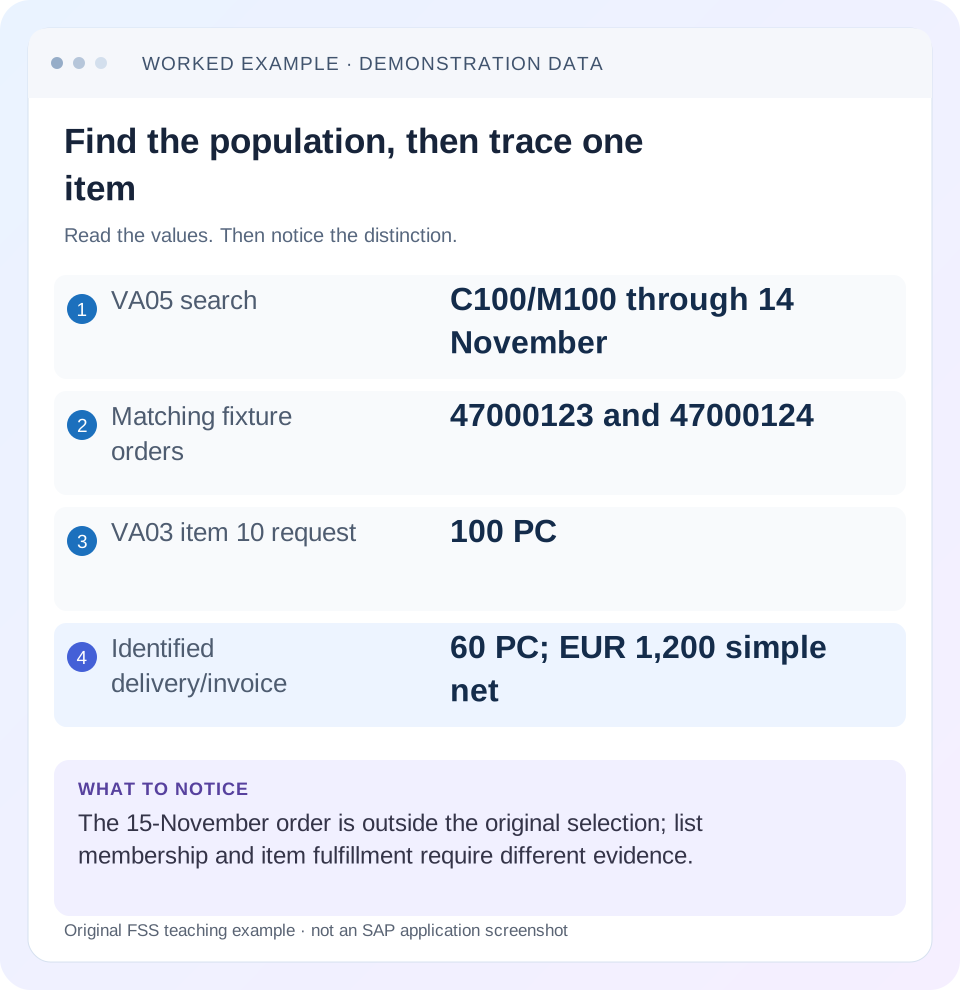
Read the example values
- VA05 search
- C100/M100 through 14 November
- Matching fixture orders
- 47000123 and 47000124
- VA03 item 10 request
- 100 PC
- Identified delivery/invoice
- 60 PC; EUR 1,200 simple net
Words you’ll meet in this guide
- Sales order
- A record of a customer’s order.
- Delivery
- A document organizing goods to be sent.
- Billing
- The process that creates a customer charge.
Preview the practical steps
SEE THE CONNECTION
See it in a simple example.
A small example to make the idea concrete.
Find and trace equipment customer orders
A manufacturer's customer-service team needs both a list of affected equipment orders and the detailed history of one selected order.
Use the list to find candidates and the display to explain one order
VA05 lists sales orders under selection criteria.
Audience and prerequisites
This tutorial is for sales operations, SD analysts and support coordinators with permitted sales-document display/list access.
Worked customer population: three orders, four items
Our fictional customer C100 has order 47000123 dated 10 November with item 10: M100 100 PC and item 20: M200 10 PC.
Find and trace equipment customer orders
A manufacturer's customer-service team needs both a list of affected equipment orders and the detailed history of one selected order.
Use the worklist for discovery and the individual document for evidence before reporting the cause of a delay.
| Reader | Business question | Evidence to carry forward |
|---|---|---|
| Equipment and component sales, dispatch and customer-service teams | Find and trace equipment customer orders | Use the worklist for discovery and the individual document for evidence before reporting the cause of a delay. |
01 Use the list to find candidates and the display to explain one order
VA05 lists sales orders under selection criteria. VA03 displays an individual sales order through the supported route. Choose according to whether you know the order or need to find a population; then connect the two views when investigation requires both.
SAP documents VA05 criteria such as order type, sold-to, document date, material and customer reference. Its VA03 documentation provides individual-display navigation and related process views. A missing order in a restrictive list is not proof that it was deleted, and a row in a list does not explain whether its goods were delivered or its invoice paid. [1] [2]
02 Audience and prerequisites
This tutorial is for sales operations, SD analysts and support coordinators with permitted sales-document display/list access. Obtain the business question, system/client, known customer/reference, expected period and any document/item numbers. Start with a read-only investigation and preserve the actual selection.
The cited app identifiers are available in their documented editions; exact screens and features vary. Modern list apps can also expose change or mass actions. Use display/navigation for diagnosis and distinguish it from an authorized business change. The tutorial does not require editing orders, creating deliveries or running unrestricted exports. [3]
03 Worked customer population: three orders, four items
Our fictional customer C100 has order 47000123 dated 10 November with item 10: M100 100 PC and item 20: M200 10 PC. Order 47000124 dated 12 November contains M100 40 PC. Order 47000125 dated 15 November contains M100 20 PC. All quantities are PC, but they refer to different materials/items.
A query for C100, document dates 1–14 November and material M100 should identify the first two orders under this fixture's matching logic. The 15-November order is outside the date range. Opening 47000123 also reveals its M200 item, which was not the material search's matching line. Candidate discovery and full document contents are different scopes.
| Order/date | Item | Material/quantity | Original M100 through 14-November match |
|---|---|---|---|
| 47000123/10 November | 10 | M100 100 PC | Included |
| 47000123/10 November | 20 | M200 10 PC | Different material |
| 47000124/12 November | 10 | M100 40 PC | Included |
| 47000125/15 November | 10 | M100 20 PC | Outside date interval |
04 Record the exact list criteria
Capture order type, sold-to, document-date interval, material, customer reference and any additional active filters in the installed app. Include saved variants and result mode where relevant. A customer saying “all my November orders” does not establish whether the analyst selected document date, requested delivery date or another period. [1]
For the fixture, retain the 14-November upper bound before changing it. If 47000125 is reported missing, compare its actual 15-November document date. Extending only the upper date to 15 November isolates that exclusion. Clearing every filter can return many documents without explaining the original absence, and can make the wrong same-customer order look like the expected result.
05 Identify the grain before counting or exporting
A display can present orders, items or schedule-related information depending on the app and view. Establish what one row represents. Repeated order numbers can be legitimate item rows, while one order row can summarize several items. Do not call either representation a duplicate without inspecting identity.
In the full fixture there are 3 orders and 4 items. Under the M100/date 1–14-November match, there are 2 relevant orders and 2 matching M100 lines. Those totals answer different questions. When exporting, retain order/item identifiers and units, then aggregate at the intended level. A sum of header values repeated per item can overstate sales even when every source row is correct.
06 Open the candidate through the supported VA03 route
SAP documents entering a sales-order ID in Display Sales Orders - VA03 and navigating from Manage Sales Orders, related apps or Enterprise Search. Use the route available to the actual role. Verify system, document type, sales area and customer before reading item status. [2]
For 47000123, confirm C100 and the intended M100 item 10. Do not assume item 20 is the reported material because it shares the same order. The known customer purchase-order reference can help confirm identity, but it may not uniquely identify one SAP order. Keep the SAP document/item as the investigation key once located.
07 Read header context and item evidence separately
The header establishes common partners, organizational context and document-level information. Item data establishes material, quantity, plant, category, pricing and relevant item status. Schedule lines then express dated quantities. A header overview cannot settle every item-level fulfillment question.
For the fixture, the 100-PC M100 request and 10-PC M200 request should not be combined into 110 PC of M100. If one item is blocked or rejected, inspect that specific state rather than describing the whole order with one unqualified label. Use the incompletion, partner or category lesson when its mechanism is the actual missing explanation.
08 Trace one item’s actual document chain
Assume item 10 has delivery 80000123 for 60 PC, with the relevant goods issue complete in the fictional process. Invoice INV-A bills those 60 PC at EUR 20 net per PC, or EUR 1,200 before tax. The order's remaining 40 PC have no delivery in this simplified chain.
The evidence supports 60 PC in the identified delivery and 60 PC billed, not full 100-PC fulfillment. Inspect delivery status to establish goods issue and accounting evidence to establish invoice transfer. A billing document in flow does not prove the customer received every ordered quantity or paid. Preserve each source-item relationship and status rather than treating document existence as universal completion.
| Stage | Quantity/value | What it establishes |
|---|---|---|
| Order 47000123/10 | 100 PC | Demand |
| Delivery 80000123 | 60 PC | Inspect picking/GI state |
| Invoice INV-A | 60 PC; EUR 1,200 net | Inspect accounting separately |
| No delivery for remainder | 40 PC | Investigate readiness and dates |
09 Distinguish existence, readiness and execution
An order can exist while unconfirmed, blocked or incomplete. A delivery can exist while picking or goods issue is unfinished. An invoice can exist while accounting transfer needs attention. These are separate process states and should drive different next investigations.
If the list finds 47000123 but no delivery covers the 40-PC balance, inspect schedule confirmations, due dates and applicable blocks. If a delivery exists but the warehouse says not shipped, inspect that delivery's picking/goods-movement evidence. If finance cannot find INV-A, inspect its accounting-transfer status. VA03 provides the starting chain; each stage's own evidence completes the explanation.
10 Troubleshoot missing documents without recreating them
If VA05 finds no result, check the exact system/client, customer identity, document type, date and reference assumptions. If VA03 can display the order, compare its actual fields with the list. If both fail to locate it, inspect whether the supplied number/reference is correct and whether a supported archive/display or other document category is involved.
Do not create another order to work around an uncertain original submission. A timeout can occur after an order was saved. Use known external/customer references and supported search to reconcile the existing outcome. Duplicate commercial orders can later create duplicate deliveries or billing even if the original issue looked like a simple search problem.
| Observation | Next check |
|---|---|
| VA03 displays, VA05 misses | Actual fields versus list filters |
| Repeated order number in export | Row grain and item identity |
| Order exists, no delivery | Confirmation, date, blocks and logistics |
| Delivery exists, no shipment | Picking/goods-movement state |
| Invoice exists, no finance result | Posting state and accounting reference |
| Original create timed out | Existing references before new order |
11 Use a disciplined investigation sequence
Write the question first:“find C100's M100 orders dated through 14 November”or“explain why 47000123 item 10 has only 60 PC delivered.”Use the list for the first and individual display for the second. Record selected candidates, then trace the specific item and missing stage.
If the candidate's date or material differs from the report, resolve identity before investigating status. If the order is correct but a follow-on document appears missing, check existing flow and the relevant process owner. A useful handoff should end with one concrete gap, such as the 40-PC delivery balance or INV-A's transfer error, rather than a pile of screenshots from unrelated tabs.
12 Verify a read-only search correction
A positive paper check finds 47000123 and 47000124 under the stated M100/date filter. A negative check expects 47000125 to remain excluded until the date bound extends. A boundary check opens 47000123 and requires the learner to recognize item 20's additional material without counting it as another M100 order.
After an authorized selection/variant correction, repeat the original business question and compare identities, not just row count. Two results can still be the wrong two orders. If the investigation includes a real functional correction, verify the same original order/item and resulting chain after the change; do not substitute a newly created order as proof that the existing case is resolved.
13 Build a useful sales-investigation worksheet
Keep list selection, order/item, requested and confirmed quantities, delivery/GI references, billing reference and accounting/payment questions in separate columns. For item 10, the concise quantity story is 100 requested,60 in the identified delivery and 40 without a delivery in the fixture. Add the dated confirmations rather than calling the remaining 40 immediately overdue without evidence.
If comparing several orders, normalize units and ensure the same business state is measured. Ordered value, delivered value and billed value are different populations. A customer total that mixes them can be numerically plausible but operationally meaningless. The worksheet should let another analyst reproduce both the selection and the document-level reasoning.
For the quantity handoff, show a source-item reconciliation rather than one order-level total: item 10 ordered 100 PC, identified delivery 60 PC, remaining 40 PC without delivery. Preserve item 20 separately as M200 10 PC. If the support question concerns total customer exposure or revenue, do not automatically value the remaining 40 as an overdue receivable; order demand, unbilled delivery and posted invoice are different financial/process populations. The appropriate report must define which one it measures.
14 Questions and a precise support conclusion
Is VA05 a substitute for one order's detailed flow?Use it to locate and compare the population, then inspect the document. Does a list row prove shipment?No. Does no row prove deletion?Compare filters and supported display scope. Can an order have several deliveries or invoices?Trace the actual references rather than assuming a one-to-one chain.
A useful conclusion says:“C100/M100 through 14 November yields 47000123 and 47000124.47000125 is dated 15 November and outside the original selection. 47000123 item 10 requests 100 PC; delivery 80000123 covers 60 PC and INV-A bills 60 at EUR 1,200 net. Remaining 40-PC readiness and fulfillment are the named next question.”That result connects search and process evidence without overstating completion.
Related services and next steps
Primary sources
Found this useful?
Share this guide with your network, or leave a like.
Your like is saved in this browser.