SAP VF03: Check billing and accounting-transfer status separately
A manufacturer has created a customer billing document, but finance still needs to establish its accounting-transfer state.

Source review:
START HERE · NO PRIOR TOPIC KNOWLEDGE NEEDED
What it is. Why it matters.
A billing document records a customer charge in sales processing. VF03 displays its details in relevant systems, including evidence needed to investigate its transfer to accounting.
Completely new to SAP?
Manufacturers use SAP to connect work such as buying components, recording inventory, planning production, shipping equipment and accounting for costs. SAP S/4HANA is an enterprise resource planning system: it connects these activities through shared business data.
Sales and Distribution connects customer orders, logistics and billing. Each stage has its own documents, quantities and status, so one stage’s success does not prove the whole sale is complete.
A transaction code, or t-code, is a shortcut to a task in classic SAP GUI. Fiori apps provide another way to work. Names and screens depend on the product and release; you do not need a live system to learn the concepts in this guide.

Scope and source-review notes
Scope and evidence
Source review by FAST SAP SOLUTIONS® editorial. This badge describes our editorial review; it does not represent SAP certification or independent endorsement.
S/4HANA billing/account-determination concepts for SD and finance support. VF03 analysis paths use on-premise documentation; posting-status and change-app examples use their cited S/4HANA edition. Actual accounts,taxes,posting periods and correction rights are configuration/localization specific.
Documentation review on 14 November 2026 used the available official SAP indexed excerpts; several SAP Help pages returned no readable full text. The worked case and proposed checks are original illustrative teaching material, not execution evidence from a customer SAP system. Exact fields, permitted actions and behavior must be confirmed against the installed product, release and configuration.
A MANUFACTURING EXAMPLE
Verify the accounting result of equipment billing
An invoice can await accounting
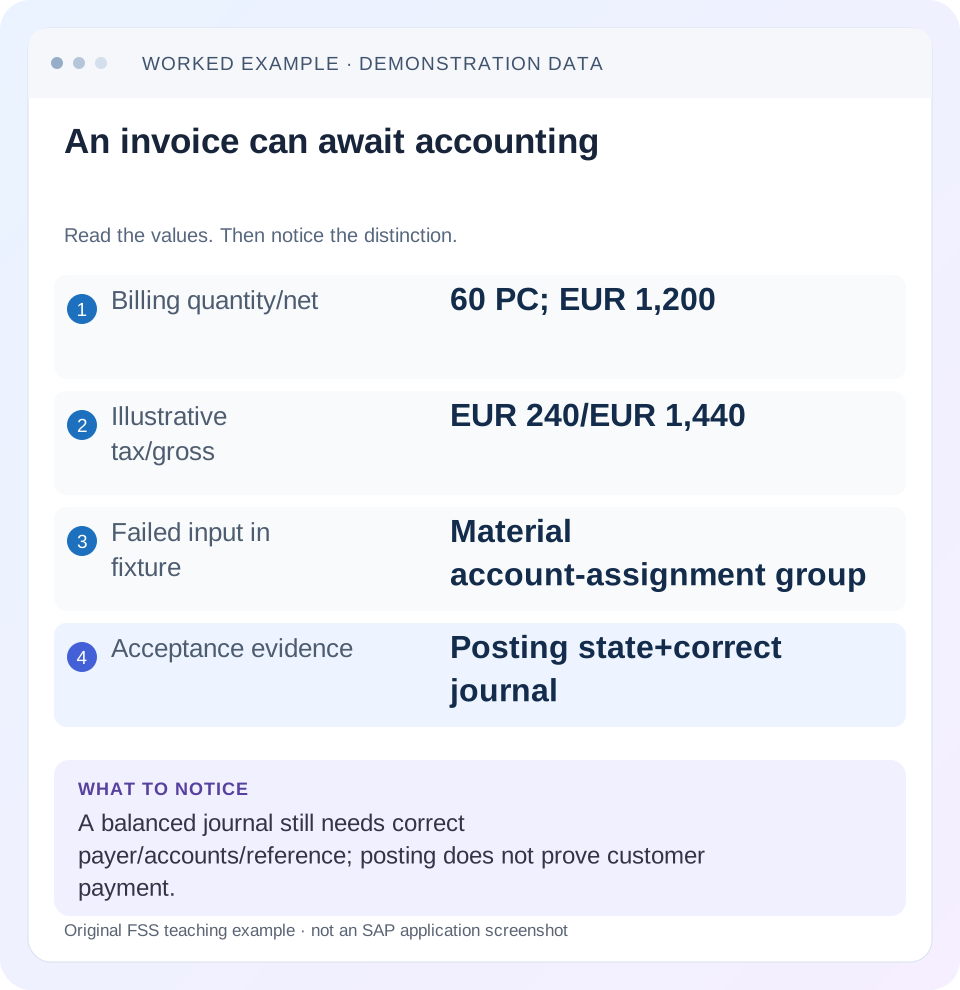
Read the example values
- Billing quantity/net
- 60 PC; EUR 1,200
- Illustrative tax/gross
- EUR 240/EUR 1,440
- Failed input in fixture
- Material account-assignment group
- Acceptance evidence
- Posting state+correct journal
Words you’ll meet in this guide
- Sales order
- A record of a customer’s order.
- Delivery
- A document organizing goods to be sent.
- Billing
- The process that creates a customer charge.
Preview the practical steps
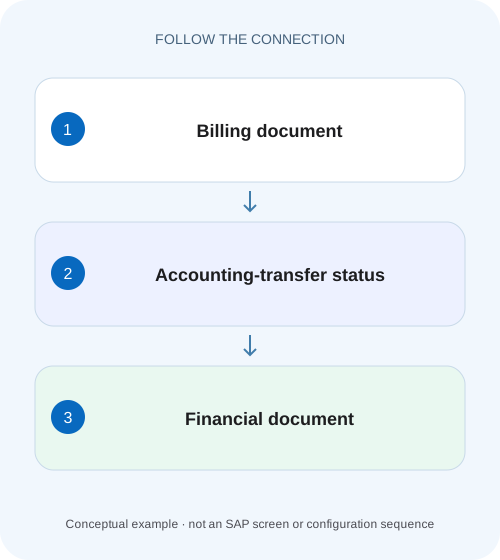
SEE THE CONNECTION
See it in a simple example.
A small example to make the idea concrete.
Verify the accounting result of equipment billing
A manufacturer has created a customer billing document, but finance still needs to establish its accounting-transfer state.
Invoice creation and accounting transfer are different stages
A billing document can exist while its accounting transfer is blocked or fails.
Audience and prerequisites
This tutorial is for SD billing, finance and application support with permitted billing/accounting display.
Worked case: invoice exists but no journal entry is established
Our fictional INV-A bills 60 PC at EUR 20 net per PC, so net value is EUR 1,200.
Verify the accounting result of equipment billing
A manufacturer has created a customer billing document, but finance still needs to establish its accounting-transfer state.
Inspect billing and accounting evidence separately before reporting that revenue-related accounting processing is complete.
| Reader | Business question | Evidence to carry forward |
|---|---|---|
| Equipment and component sales, dispatch and customer-service teams | Verify the accounting result of equipment billing | Inspect billing and accounting evidence separately before reporting that revenue-related accounting processing is complete. |
01 Invoice creation and accounting transfer are different stages
A billing document can exist while its accounting transfer is blocked or fails. Start with the original invoice's posting status and associated accounting-document evidence. A PDF or billing number does not prove that finance has the intended journal entry.
SAP documents account-determination analysis in Display Billing Documents/VF03 and separate posting/release functions. Use display to establish state and diagnose the error; the posting action can create accounting effects and belongs to the authorized business process. Do not create a second invoice merely because the original is not yet visible where finance expected it. [1] [2]
02 Audience and prerequisites
This tutorial is for SD billing, finance and application support with permitted billing/accounting display. Obtain billing document/item, company context, billing date, currency, source delivery/order and exact transfer message. Establish whether the document type is accounting-relevant and whether a journal entry already exists.
The worked invoice is a conventional customer charge. Pro forma documents, cancellations, intercompany and specialized billing can have different accounting relevance and behavior. Paths and status labels vary by installed edition/release. The illustrative account classifications and tax arithmetic below are not chart-of-accounts advice or a tax-rate recommendation.
03 Worked case: invoice exists but no journal entry is established
Our fictional INV-A bills 60 PC at EUR 20 net per PC, so net value is EUR 1,200. For arithmetic only, assume 20-percent tax gives EUR 240 and gross receivable EUR 1,440. The intended document concerns company 1000 and the correct payer. Its accounting transfer reports an account-determination error.
The billing document displays a customer account-assignment group but the relevant material account-assignment group is missing. That observation gives a specific diagnosis branch. It does not establish which group or G/L account is commercially correct, and it does not prove that a manual posting or cancellation is the appropriate recovery.
| Measure | Value | Evidence role |
|---|---|---|
| Billing quantity | 60 PC | Original source/item |
| Net | EUR 1,200 | 60×EUR 20 |
| Illustrative tax | EUR 240 | 20% assumption only |
| Gross receivable | EUR 1,440 | Net+tax |
| Missing input | Material account-assignment group | Inspect exact billing item |
04 Confirm the invoice identity and current status
Open INV-A through the supported VF03/display route and verify customer/payer, company, billing date, currency and source/item references. Inspect current posting/transfer status and any associated accounting-document navigation. Keep the status timestamp with the incident evidence.
If an accounting reference exists, follow it before assuming transfer failed. A finance search can miss a document because of company code, fiscal year, date or reference criteria. Conversely, an output successfully sent to the customer can coexist with an unresolved posting issue. Billing, output and accounting states should be reported separately.
05 Inspect the payer account-assignment group
SAP's on-premise guide identifies the payer's account-assignment group in the billing header details, including the Acct Assmt Grp Cust field. It documents the classic-style route More → Goto → Header → Header Detail or equivalent navigation. Use the installed display's accounting context if labels differ. [1]
Record the actual value in INV-A and compare it with the intended master/configuration meaning. The sold-to's name is not a substitute for the payer input used in this analysis. If the value is missing or wrong, identify the responsible master/document correction process rather than selecting an arbitrary group that happens to find an account.
06 Inspect the material group on the exact billing item
The same SAP guide locates AcctAssmtGrpMat in the item's Accounting section. Open the specific failed billing item and inspect its value. Another item can have a valid group while this one does not, so a header-only review can miss the error. [1]
For the fixture, the missing value is on the 60-PC material item. Compare the material's relevant approved classification and document data with the master-data owner. A master-data update alone does not prove the existing invoice now contains the corrected value. Follow the installed document correction procedure and verify the actual saved input before a supported posting retry.
07 Analyze revenue-account determination when inputs exist
When both groups are present but determination still fails, SAP documents simulation through More → Environment → Acc. Determ. Analysis → Revenue Accounts in the cited display app. The analysis exposes determined accounts for review with finance. Use it to inspect the actual decision rather than guessing a G/L number. [1]
Compare the document's relevant determination inputs and configured mapping with the approved account meaning. A technically found account can still be wrong for the business classification. The exact determination design can include additional keys; do not reduce every account problem to the two group fields alone. Preserve the specific analysis/error with the invoice/item identity.
08 Distinguish account determination from other posting barriers
If the error concerns another missing field, posting date/period, currency or accounting validation, follow that exact branch with finance. A successful revenue-account simulation does not establish that all accounting prerequisites pass. Read the current message after each justified correction rather than repeatedly changing mapping.
Also inspect intentional posting blocks or relevant creation options where the documented process uses them. An unposted invoice may be held by design rather than defective. The business question is whether this invoice should now be posted under the approved process, not simply whether a user can remove every barrier visible in the app.
| Observation | Next evidence |
|---|---|
| No journal established | Actual posting state and transfer message |
| Material group missing | Exact item classification and supported correction |
| Both groups present, error remains | Revenue-account simulation and other keys |
| Account found, posting still fails | Current finance validation/message |
| Document already posted | Existing journal and supported correction trail |
| Pro forma/no accounting relevance | Expected document-type behavior |
09 Plan the supported correction and posting action
Record the cause, approved classification or configuration correction, affected scope and verification. If a shared mapping changes, test relevant positive and unaffected cases in the approved environment. Do not assign a catch-all revenue account to make the transfer succeed without finance acceptance.
SAP documents posting/release from Manage Billing Documents or Change Billing Documents in the cited Cloud scope, and Release to Accounting for an individual document. Confirm the original persisted state before using the supported action. If a prior attempt timed out, reconcile journal-entry existence first so the recovery decision is based on the actual document outcome. [2]
10 Understand posted versus unposted correction limits
SAP's Change Billing Documents documentation distinguishes permitted changes before and after posting. Once posted, available changes are restricted, and other corrections can require cancellation/recreation under that process. Do not assume an accounting-relevant invoice can always be repriced or have its date edited freely after posting. [3]
This distinction matters when the problem is “wrong account already posted”rather than“no account found.”The first requires review of the existing financial effect and supported correction trail. The second may be resolved before successful transfer. Both need the actual original state, not a blanket instruction to cancel every invoice with an accounting complaint.
11 Verify posting status and the complete accounting identity
The cited posting documentation uses statusC for a created journal entry in its scope. Confirm the actual release result and follow the associated accounting reference, including the company code, fiscal year and document number required by the finance display. A matching number alone may not uniquely identify a financial document across years/companies. [2]
For the fixture, verify the intended receivable, revenue and tax lines under the training account design. The simplified entry is debit receivable EUR 1,440, credit revenue EUR 1,200 and credit tax EUR 240. Debits and credits balance at EUR 1,440 each. Balance is necessary but insufficient: the correct payer, accounts, currency, dates and source reference must also be established.
| Line | Debit | Credit |
|---|---|---|
| Customer receivable | EUR 1,440 | — |
| Revenue | — | EUR 1,200 |
| Tax | — | EUR 240 |
| Total | EUR 1,440 | EUR 1,440 |
12 Separate posting from payment and settlement
A posted invoice creates the relevant accounting effect; it does not establish that the customer paid. Inspect open-item, clearing or payment evidence through the finance process when that is the business question. Do not close a payment incident solely because INV-A reached posting statusC.
Likewise, a canceled billing document or credit memo has its own accounting relationship. If corrections already exist, trace those references rather than comparing one positive invoice amount with a finance total that includes offsets. Preserve which document each financial line belongs to so the final explanation can distinguish original charge, correction and settlement.
13 Positive, negative and boundary verification
A positive training check corrects the approved missing input through the supported process, then verifies successful original-invoice posting and the balanced expected journal. A negative fixture supplies a technically valid but wrong classification; the learner should reject the account result even if posting succeeds. Another leaves an unrelated posting prerequisite unresolved and expects the current exact error to remain visible.
A boundary fixture is pro forma and not accounting-relevant: the absence of a journal entry can be expected rather than a transfer failure. A second boundary already has a posted entry but finance searched the wrong year. The learner should locate the original rather than create another invoice. These checks test state, identity and business correctness beyond one green status. [4]
For a concrete negative accounting check, keep the illustrative journal balanced but assign the EUR 1,200 credit to an account that finance identifies as inappropriate for the material classification. The entry still totals EUR 1,440 on each side. The learner should reject it because balance alone cannot validate revenue classification. Repeat the same check for payer identity: posting to another customer can also balance while failing the actual invoice requirement.
14 Questions and a useful transfer handoff
Does a billing PDF prove accounting completion?No. Does posting status prove payment?No. Is every unposted billing document an error?Check type, relevance and intentional controls. Does a found revenue account prove correct classification?Review with finance and inspect the actual journal.
A useful handoff names INV-A/item, source 60 PC, EUR 1,200 net/EUR 1,440 gross under the illustrative tax assumption, current transfer state, actual group inputs and analysis result. After recovery, add the complete accounting identity and verified lines. That gives SD and finance a concrete shared trail while keeping invoice creation, account determination, posting and settlement as separate evidence-backed stages.
Related services and next steps
Primary sources
Found this useful?
Share this guide with your network, or leave a like.
Your like is saved in this browser.