SAP route determination: Check shipping conditions and transportation group
Two equipment deliveries have similar quantities but different shipping requirements and route results.

Source review:
START HERE · NO PRIOR TOPIC KNOWLEDGE NEEDED
What it is. Why it matters.
A route describes a shipping journey under configured rules. Route determination uses relevant order, partner and material-related inputs to choose an appropriate logistics route.
Completely new to SAP?
Manufacturers use SAP to connect work such as buying components, recording inventory, planning production, shipping equipment and accounting for costs. SAP S/4HANA is an enterprise resource planning system: it connects these activities through shared business data.
Sales and Distribution connects customer orders, logistics and billing. Each stage has its own documents, quantities and status, so one stage’s success does not prove the whole sale is complete.
A transaction code, or t-code, is a shortcut to a task in classic SAP GUI. Fiori apps provide another way to work. Names and screens depend on the product and release; you do not need a live system to learn the concepts in this guide.

Scope and source-review notes
Scope and evidence
Source review by FAST SAP SOLUTIONS® editorial. This badge describes our editorial review; it does not represent SAP certification or independent endorsement.
Classic LE Shipping route determination for SD/shipping analysts, using S/4HANA on-premise and ERP route-schedule documentation. EWM routing guides and Transportation Management have separate designs; this is not a universal route-planning algorithm or transit-time promise.
Documentation review on 14 November 2026 used the available official SAP indexed excerpts; several SAP Help pages returned no readable full text. The worked case and proposed checks are original illustrative teaching material, not execution evidence from a customer SAP system. Exact fields, permitted actions and behavior must be confirmed against the installed product, release and configuration.
A MANUFACTURING EXAMPLE
Explain an equipment shipment route
Same departure, different transport need
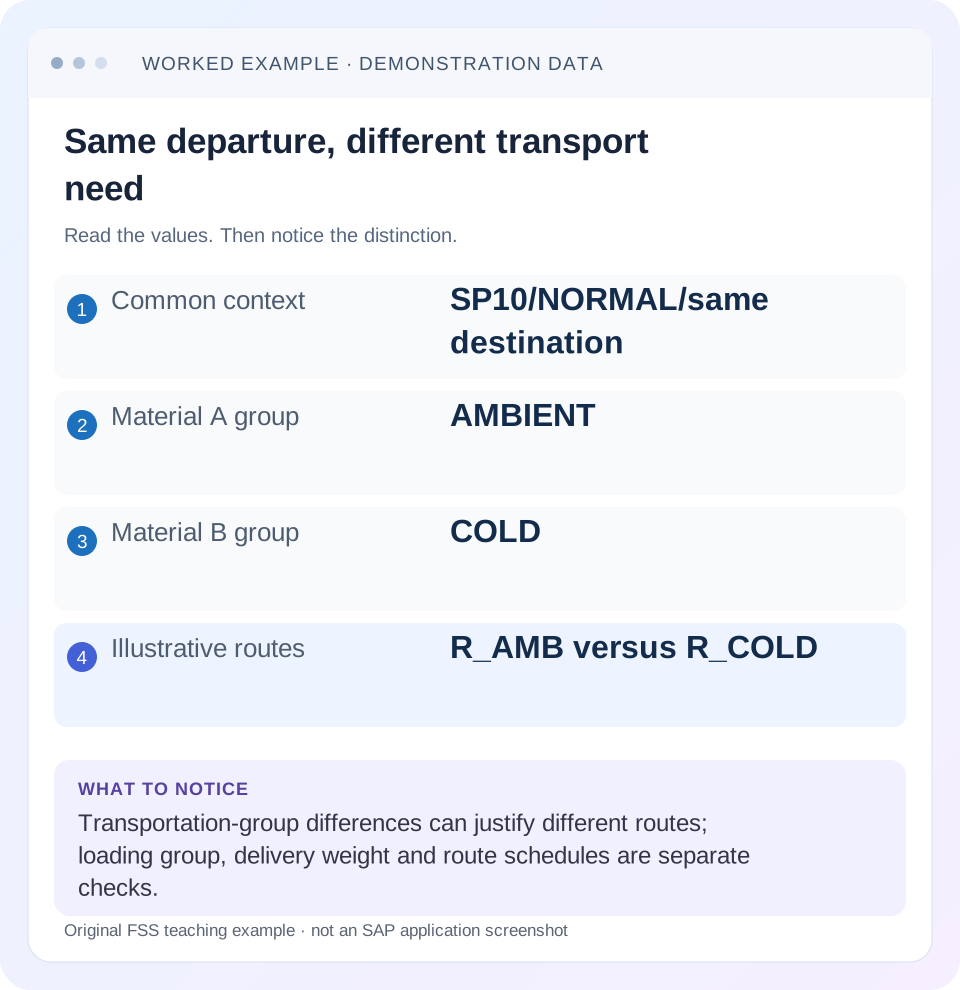
Read the example values
- Common context
- SP10/NORMAL/same destination
- Material A group
- AMBIENT
- Material B group
- COLD
- Illustrative routes
- R_AMB versus R_COLD
Words you’ll meet in this guide
- Sales order
- A record of a customer’s order.
- Delivery
- A document organizing goods to be sent.
- Billing
- The process that creates a customer charge.
- EWM
- Extended Warehouse Management: SAP’s application for warehouse processes.
Preview the practical steps
SEE THE CONNECTION
See it in a simple example.
A small example to make the idea concrete.
Explain an equipment shipment route
Two equipment deliveries have similar quantities but different shipping requirements and route results.
Route determination is an input-and-rule question
When two similar orders get different routes, compare their actual logistics inputs before changing route configuration.
Audience and prerequisites
This tutorial is for shipping and SD support analysts with permitted sales-order, delivery and relevant master/configuration display.
Worked pair: equal quantity, different transport requirement
Order A and order B each request 20 PC from plant 1000 and shipping point SP10 to the same regional customer.
Explain an equipment shipment route
Two equipment deliveries have similar quantities but different shipping requirements and route results.
Compare the documented route-determination inputs rather than expecting equal quantities to imply equal transport handling.
| Reader | Business question | Evidence to carry forward |
|---|---|---|
| Equipment and component sales, dispatch and customer-service teams | Explain an equipment shipment route | Compare the documented route-determination inputs rather than expecting equal quantities to imply equal transport handling. |
01 Route determination is an input-and-rule question
When two similar orders get different routes, compare their actual logistics inputs before changing route configuration. SAP's classic sales-order route proposal uses shipping-point departure country/zone, order shipping condition, material transportation group and ship-to country/transportation zone. Similar customer names or equal quantities do not establish an equal combination. [1]
The route influences transportation scheduling. A route being present therefore answers more than a display-label question, but it does not prove departure schedules, carrier capacity or actual shipment occurred. Identify whether the symptom concerns route proposal, delivery redetermination, route-schedule selection or an unexpected date. [1]
02 Audience and prerequisites
This tutorial is for shipping and SD support analysts with permitted sales-order, delivery and relevant master/configuration display. Obtain order/item, actual route, shipping point, shipping condition, material transportation group, destination and the expected logistics requirement. Include creation/change times when comparing old and new proposals.
The scope is classic LE Shipping route determination. EWM routing guides and SAP Transportation Management can use different objects and rules. Even within LE, delivery type and configuration affect redetermination and scheduling behavior. The fictional route and zone codes below illustrate a configured matrix; they are not delivered SAP defaults or recommended production routes.
03 Worked pair: equal quantity, different transport requirement
Order A and order B each request 20 PC from plant 1000 and shipping point SP10 to the same regional customer. Both use shipping condition NORMAL. Material A has transportation group AMBIENT, while material B has group COLD because its approved handling requires refrigerated transport.
The fictional configured matrix proposes route R_AMB for AMBIENT and R_COLD for COLD with the same departure/destination context. The different result can be correct. Changing COLD to AMBIENT merely to make the orders match would remove a meaningful logistics requirement instead of fixing a route defect. First establish whether the material classification and business requirement agree.
| Departure/destination | Shipping condition | Transportation group | Proposed route |
|---|---|---|---|
| SP10 zoneD 1 to zoneN 1 | NORMAL | AMBIENT | R_AMB |
| SP10 zoneD 1 to zoneN 1 | NORMAL | COLD | R_COLD |
04 Draw the full route-proposal key
Record departure country/zone from the actual shipping point, shipping condition from the order, transportation group from the relevant material data and destination country/zone from the actual ship-to context. Keep the source of each value with it. Do not replace the shipping point's departure context with the plant code by assumption. [1]
For the pair, all fields except transportation group are held constant. If the ship-to differs, the comparison no longer isolates the group. If the shipping point differs, departure context may differ too. A useful diagnostic matrix makes these hidden differences visible before anyone calls the route table inconsistent.
05 Inspect document values versus current defaults
The order's shipping condition is the input to inspect for this proposal. A current customer default is useful context but does not prove which value the existing document contains. Likewise, a material's current transportation group may differ from the value or determination context relevant to an earlier document.
Record permitted manual changes and document history where relevant. If only newly created orders behave differently, compare the timing of master/configuration changes and the supported redetermination behavior. Do not force all old documents to match a current master value without confirming the approved business scope and the existing logistics commitments.
06 Do not confuse loading group with transportation group
The loading group participates in classic shipping-point determination, while the transportation group participates in route proposal. They can both describe logistics characteristics but answer different questions. A material can need one loading method and a particular transport environment independently. [3]
For the fixture, both materials might use loading group PALLET while only one needs group COLD for transportation. If the shipping point is wrong, inspect plant/shipping condition/loading-group determination. If shipping point is correct but route differs, inspect the route's own key. Changing the wrong group can create a new shipping-point problem while leaving the original route cause unexplained.
| Input | Used in classic example | Question |
|---|---|---|
| Loading group | Shipping-point determination | How are goods handled/loaded? |
| Transportation group | Route proposal | What transport characteristics are required? |
| Both PALLET loading | Can share shipping point | Does not imply same transport group |
| COLD transportation | Refrigerated requirement | Do not erase to mimic ambient route |
07 Compare the actual configuration for the observed combination
With the configuration owner, inspect the approved route-determination entry corresponding to the actual key. Establish whether the proposed route matches that entry and whether a documented fallback or manual selection applies. A correct rule for an incorrect input is a data/determination issue, while an incorrect rule for correct inputs is a configuration issue.
Use a working pair with equivalent scope. A successful route for another country, shipping point or transport group is not proof that this combination exists. If no route is proposed, identify the missing or mismatched key component before creating a broad generic entry. Such an entry can mask incomplete classification and route unintended traffic.
08 Understand delivery redetermination and weight context
SAP's route documentation distinguishes an order-item route from the delivery route, which applies across the delivery's items. It describes optional delivery redetermination and an additional weight-group factor based on total delivery weight. Therefore, a later delivery route can legitimately differ from the earlier order proposal under its configuration. [1]
Suppose a training delivery consolidates enough material to cross a configured weight-group boundary. Inspect actual total weight and units, delivery type and redetermination setting before calling the changed route a bug. Do not apply that explanation automatically to a system where redetermination is inactive. The observed configuration and weight evidence must support the branch.
09 Separate route proposal from a recurring route schedule
A route describes the transport path/means and relevant scheduling context. A route schedule adds an actual recurring departure arrangement under its documented rules. SAP's ERP route-schedule reference includes shipping point, ship-to/unloading point, shipping condition, transportation group and calendar-week/year context. [2]
If R_COLD is correct but a desired departure is not proposed, inspect the relevant schedule and period rather than editing the route-proposal matrix. A week-specific schedule can differ from a recurring entry. Working times and other schedule prerequisites also matter in the cited classic design. A route code alone cannot establish that the next suitable departure exists on the customer's requested day.
10 Reason about timing without inventing a transit promise
Changing a route can affect transportation scheduling and consequently earlier processing dates or proposed arrival. Compare the relevant before/after dates using the same customer request and documented scheduling inputs. Preserve calendar and time-unit context. [1]
For a paper example, R_AMB might have an illustrative two-day transit and R_COLD three days. If dispatch is 20 November under a simplified calendar with every day usable, arrivals would be 22 and 23 November. That arithmetic teaches the effect of one extra day; it is not an SAP-calculated promise. Real calendars, planning/loading durations and schedule cutoffs must be evaluated by the actual process.
11 Troubleshoot the first differing boundary
If the order route is wrong, compare its input key and rule. If the order is right but delivery differs, inspect delivery redetermination, weight and manual route history. If route is right but departure/date is wrong, inspect route schedules and scheduling. If only one material differs, inspect its transportation requirement and group.
If changing the ship-to changes the route, that can follow the documented destination-based logic; verify the new destination and dates. If a manually chosen route conflicts with the approved handling, review the supported consistency checks and business decision. Repeatedly overwriting the route without explaining inputs makes future scheduling and incident analysis less reliable.
| Observation | Next check |
|---|---|
| No or wrong order route | Full proposal key and matching rule |
| Delivery route differs | Redetermination, weight and manual history |
| Route correct, date wrong | Scheduling and recurring departure context |
| Only one material differs | Transportation group and requirement |
| Ship-to changed | Destination zone and revised route/date |
12 Practice a controlled comparison
Create a paper worksheet for the 20-PC ambient and cold items with identical departure, destination and shipping condition. Predict R_AMB versus R_COLD from the fictional matrix, then change only the transportation group and repeat the lookup. The exercise isolates cause without editing real master data.
Next change only the shipping condition or destination zone and identify which matrix row must be reviewed. Add a delivery-weight-group variation and state that its effect requires active delivery redetermination. Finally keep the route constant but remove a week-specific departure schedule; the learner should move to scheduling rather than claim route proposal failed.
13 Verify an approved correction and unaffected traffic
In a controlled training scenario, verify the intended route, actual input key and resulting schedule dates after the approved data/rule correction. Include a representative material from the unaffected transport group. If COLD was corrected, AMBIENT should retain its approved path rather than inheriting a broad new route.
Inspect the delivery's route separately if the process redetermines it. Confirm that the route remains compatible with the actual handling requirement and that relevant downstream planning/output uses the intended data. A correct route field is insufficient if the delivery was created under the wrong ship-to or an unsupported manual override. Record actual observations and their scope.
14 Questions and a useful route handoff
Does the plant alone determine the route? The documented classic proposal uses a larger logistics key. Are loading and transportation groups interchangeable? No; inspect their different determination roles. Can delivery route differ from order route? Review redetermination and delivery-specific factors. Does a route guarantee a departure time? Inspect the route schedule and planning evidence.
A useful handoff names order/item, actual route and complete proposal key, expected handling requirement, relevant delivery/weight state and the first differing boundary. For the fixture: “SP10/NORMAL/same destination; AMBIENT and COLD intentionally differ; verify each configured route and schedule.” That supports a precise correction while preserving the logistics distinctions the business actually needs.
Related services and next steps
Primary sources
Found this useful?
Share this guide with your network, or leave a like.
Your like is saved in this browser.