SAP shipping point versus plant: Check the logistics assignment
A machinery plant has more than one loading capability, and dispatch needs to understand why an equipment order uses a particular shipping point.

Source review:
START HERE · NO PRIOR TOPIC KNOWLEDGE NEEDED
What it is. Why it matters.
A plant is an organizational location for relevant business operations. A shipping point organizes shipping activity, and its determination uses the applicable assignments and inputs.
Completely new to SAP?
Manufacturers use SAP to connect work such as buying components, recording inventory, planning production, shipping equipment and accounting for costs. SAP S/4HANA is an enterprise resource planning system: it connects these activities through shared business data.
Sales and Distribution connects customer orders, logistics and billing. Each stage has its own documents, quantities and status, so one stage’s success does not prove the whole sale is complete.
A transaction code, or t-code, is a shortcut to a task in classic SAP GUI. Fiori apps provide another way to work. Names and screens depend on the product and release; you do not need a live system to learn the concepts in this guide.

Scope and source-review notes
Scope and evidence
Source review by FAST SAP SOLUTIONS® editorial. This badge describes our editorial review; it does not represent SAP certification or independent endorsement.
Classic LE Shipping organizational concepts for SD/shipping support,with ERP and S/4HANA documentation. The three-input example is a configured design; current S/4HANA documentation also describes plant-only determination options. Storage-location-specific and external warehouse designs require their own scope.
Documentation review on 14 November 2026 used the available official SAP indexed excerpts; several SAP Help pages returned no readable full text. The worked case and proposed checks are original illustrative teaching material, not execution evidence from a customer SAP system. Exact fields, permitted actions and behavior must be confirmed against the installed product, release and configuration.
A MANUFACTURING EXAMPLE
Separate the making site from the dispatch point
One plant, two handling requirements
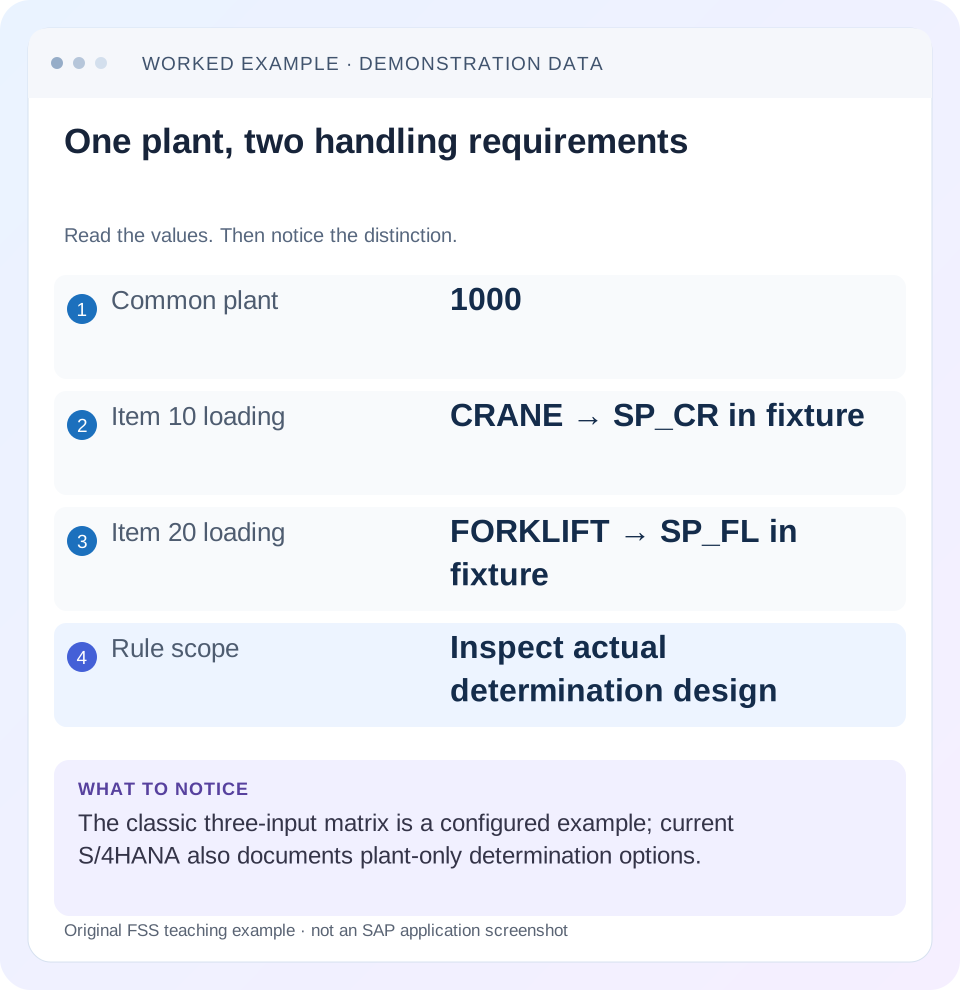
Read the example values
- Common plant
- 1000
- Item 10 loading
- CRANE → SP_CR in fixture
- Item 20 loading
- FORKLIFT → SP_FL in fixture
- Rule scope
- Inspect actual determination design
Words you’ll meet in this guide
- Sales order
- A record of a customer’s order.
- Delivery
- A document organizing goods to be sent.
- Billing
- The process that creates a customer charge.
- HANA
- SAP’s database platform.
- EWM
- Extended Warehouse Management: SAP’s application for warehouse processes.
Preview the practical steps
SEE THE CONNECTION
See it in a simple example.
A small example to make the idea concrete.
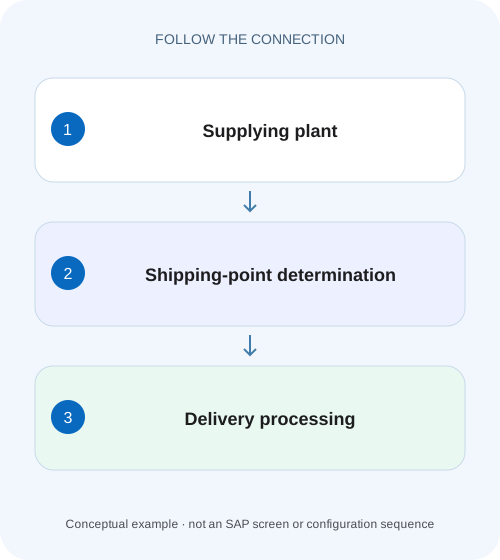
Separate the making site from the dispatch point
A machinery plant has more than one loading capability, and dispatch needs to understand why an equipment order uses a particular shipping point.
A plant and a shipping point are different organizational objects
The delivering plant identifies the relevant supplying organizational context for the sales item.
Audience and prerequisites
This tutorial is for sales/shipping support and SD configuration owners.
Worked plant: one site, two loading capabilities
Our fictional plant 1000 supplies material HEAVY_A and PALLET_B.
Separate the making site from the dispatch point
A machinery plant has more than one loading capability, and dispatch needs to understand why an equipment order uses a particular shipping point.
Check plant and shipping-point determination in their own roles before changing the supplying site.
| Reader | Business question | Evidence to carry forward |
|---|---|---|
| Equipment and component sales, dispatch and customer-service teams | Separate the making site from the dispatch point | Check plant and shipping-point determination in their own roles before changing the supplying site. |
01 A plant and a shipping point are different organizational objects
The delivering plant identifies the relevant supplying organizational context for the sales item. A shipping point organizes delivery processing and goods issue. Even when both use code 1000, they are not the same object. A correct plant does not by itself explain why a particular shipping point was selected.
SAP documents shipping points as independent organizational entities and one shipping point per delivery. Its classic determination example uses plant, shipping condition and material loading group. Current S/4HANA documentation also describes configuration based on plant alone. Therefore, inspect the actual supported determination design rather than asserting every landscape must use all three inputs identically. [1] [2]
02 Audience and prerequisites
This tutorial is for sales/shipping support and SD configuration owners. Obtain order/item, actual delivering plant, shipping point, shipping condition, material loading group and expected logistics activity. You need permitted document/master/configuration display; use a training fixture for changes or delivery-creation tests.
The worked case is conventional LE shipping with two loading methods at one plant. It does not equate a shipping point with a warehouse number, storage location or physical building. Those can be related through the landscape design but remain different concepts. Plant-only, storage-location-specific, EWM or transportation integration requires its own documented determination and execution boundaries.
03 Worked plant: one site, two loading capabilities
Our fictional plant 1000 supplies material HEAVY_A and PALLET_B. Both use shipping condition NORMAL. HEAVY_A has loading group CRANE and should use shipping point SP_CR. PALLET_B has loading group FORKLIFT and should use SP_FL. The configured matrix intentionally gives different points within the same supplying plant.
Order 47000123 contains item 10:2 PC of HEAVY_A and item 20:10 PC of PALLET_B. A user expects one shipping point because both come from plant 1000. The correct explanation is the actual logistics design: the items need different loading arrangements. Equal plant identity does not erase those requirements.
| Plant | Shipping condition | Loading group | Shipping point |
|---|---|---|---|
| 1000 | NORMAL | CRANE | SP_CR |
| 1000 | NORMAL | FORKLIFT | SP_FL |
04 Capture the effective determination inputs
Display the actual plant and shipping point on each order item. Compare the relevant shipping condition and loading group with the approved matrix. Keep the document values and source/master context together so a current default is not mistaken for an existing document's effective input.
For item 10, the expected tuple is plant 1000/NORMAL/CRANE. If it instead shows FORKLIFT, inspect the material's relevant loading-group assignment and document determination history. If all inputs are correct but SP_FL is proposed, inspect the matching configuration entry or an allowed manual choice. The first difference determines whether the issue is master data, determination or deliberate exception.
05 Understand loading-group purpose and maintenance scope
SAP's current Loading Groups documentation describes handling characteristics such as crane or forklift and locates the field in the material master's Sales: General/Plant context. In classic systems, the documented maintenance tool can be MM02; use permitted display and the actual product's maintenance process for diagnosis/correction. [3]
Do not change CRANE to FORKLIFT merely to consolidate deliveries. That would misclassify handling and can affect other orders for the material. Establish whether the business requirement truly changed. If the group is wrong, correct it with the owner and verify the supported effect on existing versus new documents. A master-data save is not evidence that old orders automatically redetermined.
06 Review shipping condition independently
Shipping condition represents relevant service/shipping requirements in the determination design. Inspect its actual order and partner-source context. Do not assume a customer's current default equals every existing order's value or that a manual document value is always erroneous.
For the fixture, NORMAL is held constant to isolate loading group. A separate urgent-service condition could legitimately map the same plant/loading group to another point if the configured design supports it. Compare the actual tuple with the business agreement. Changing a shared shipping condition to fix one order can affect more than that item, including route and schedule behavior.
07 Verify the plant before blaming shipping-point configuration
If the delivering plant is missing or wrong, the shipping-point proposal can fail or use another intended matrix row. SAP's classic reference notes incompletion when a point cannot be determined, for example because the plant is missing. Resolve the supplying context first. [1]
A manual shipping-point entry cannot create the missing stock/supply relationship or make an invalid plant assignment correct. Inspect the order's plant determination and approved master/document inputs through the relevant process. If item 10 belongs to plant 2000 rather than 1000, the expected SP_CR rule for 1000 is not evidence of a configuration defect in 2000.
08 Check assignment and valid alternative points
Confirm the shipping point exists in the approved organizational design and is valid for the intended activity/plant combination. SAP documents that a proposed shipping point can be changed within specified limits and illustrates permitted alternatives. It also documents rejection of an invalid choice. [1] [2]
An allowed alternative is not automatically an approved operational choice. If SP_CR is temporarily unavailable, the business must establish that an alternative can handle the crane requirement and relevant capacity/timing. Use the supported selection, not an arbitrary code that happens to save. Preserve the reason so later users understand why this order differs from the normal proposal.
09 Understand the delivery implication without overclaiming split rules
SAP states that a delivery is processed by one shipping point. Therefore, item 10 at SP_CR and item 20 at SP_FL cannot simply be treated as one shared shipping-point execution context. Inspect the actual delivery creation results and supported grouping logic. [1]
Shipping point is not the only delivery combination criterion. Ship-to, dates and other configured factors can also matter, so do not promise that equal points guarantee one delivery or that a proposed override will consolidate everything. For the fixture, the useful outcome is correctly assigned items and an explained delivery population, not the smallest possible document count.
10 Follow consequences for due-list selection and scheduling
A worklist restricted to SP_CR can exclude item 20 assigned to SP_FL. That does not mean the second item was deleted or lacks stock. Compare actual item shipping point with the list and its date criteria. The linked delivery-due lesson explains how to isolate selection differences.
Shipping-point working times and processing assumptions can also participate in scheduling under the installed design. If a permitted alternative changes dates, inspect the relevant timing inputs rather than restoring an old date manually. A shipping point is an operational assignment with downstream effects, not merely a label to make list selection easier.
11 Troubleshoot the first missing or wrong object
No plant: inspect supplying-plant determination. Plant correct, loading group wrong: inspect material classification. Inputs correct, no proposal: inspect matching rule/assignment. Proposal differs only in an old document: inspect saved values, manual changes and supported redetermination. Valid point but delivery fails: read the actual creation log and remaining prerequisites.
If an operator reports “wrong warehouse, ”clarify whether they mean plant, shipping point, storage location or EWM warehouse. These terms can describe different ownership. Correctly diagnosing SP_FL does not necessarily explain a picking location inside the warehouse; follow the relevant execution object when that is the real symptom.
| Observation | Next check |
|---|---|
| Plant missing | Supplying context and incompletion |
| Loading group unexpected | Relevant material/master classification |
| Inputs correct, no point | Matching rule and organizational validity |
| Only old order differs | Saved values and supported redetermination |
| Wrong warehouse reported | Clarify plant, point, location or EWM object |
12 Practical comparison worksheet
Create one row for each order item with material, plant, shipping condition, loading group, proposed/actual shipping point and intended handling. For the case, item 10 is 2 PC/CRANE/SP_CR and item 20 is 10 PC/FORKLIFT/SP_FL. Compare those values with the documented matrix before planning a change.
Add existing delivery references and current due-list selection. If delivery 80000123 already covers item 10's 2 PC, do not create another one while investigating item 20. A repeated creation after an uncertain client response needs document-flow reconciliation. Preserve quantity and source identity, not only the shipping-point code, because an otherwise correct point can still process the wrong item.
| Item/material | Quantity | Plant/loading | Expected point |
|---|---|---|---|
| 10 HEAVY_A | 2 PC | 1000/CRANE | SP_CR |
| 20 PALLET_B | 10 PC | 1000/FORKLIFT | SP_FL |
| Both | Different handling | Same plant/NORMAL condition | Difference is intentional |
13 Verify positive, negative and boundary combinations
The positive paper fixture predicts SP_CR for 1000/NORMAL/CRANE and SP_FL for 1000/NORMAL/FORKLIFT. A negative fixture tries an unconfigured/invalid alternative and expects the documented controlled rejection rather than silent acceptance. A boundary fixture uses a plant-only determination design and asks the learner to inspect that configuration instead of demanding loading-group differentiation.
For a controlled real correction, verify the actual points in new or supported redetermined documents, then inspect delivery creation and dates. Include the unaffected loading-group item. If a shared rule changed, confirm that FORKLIFT traffic was not accidentally redirected to a crane-only process. Record actual outcomes and the exact configuration scope tested.
A useful boundary comparison is a correctly configured plant-only rule. In that paper fixture, both materials can receive the same shipping point because the design intentionally does not distinguish loading groups for proposal. The analyst should then verify that operational handling is still appropriate through the supported process, rather than call the common code incorrect solely because the classic example differed. This prevents a documentation example from becoming an invented universal requirement.
Another boundary uses storage-location-specific shipping-point determination where that feature is actually deployed. Identify its documented additional key and scope before comparing it with the simple matrix. A rule using another logistics object is not evidence that plant and shipping point have become identical; it means the landscape has a more specific supported determination design. Keep that feature-specific investigation separate from the conventional two-material worked case.
14 Questions and a useful logistics handoff
Can one plant have several shipping points?Yes, in the documented design. Does a shipping point equal a storage location?They are distinct objects. Do all systems require the three-input matrix?Current documentation allows other supported options, including plant-only configuration. Does one point guarantee one combined delivery?Other combination criteria still matter.
A useful note says:“Order 47000123 plant 1000: HEAVY_A 2 PC uses CRANE/SP_CR; PALLET_B 10 PC uses FORKLIFT/SP_FL under the approved matrix. Actual inputs, permitted alternatives and existing deliveries checked. Remaining issue belongs to the named item/process.” That explains logistics assignment without replacing business handling requirements with convenient matching codes.
Related services and next steps
Primary sources
Found this useful?
Share this guide with your network, or leave a like.
Your like is saved in this browser.