SAP SD billing reference problem: Identify the right copy-control relationship
A machinery manufacturer delivered only part of an order and needs to explain the quantity and reference used for billing.

Source review:
START HERE · NO PRIOR TOPIC KNOWLEDGE NEEDED
What it is. Why it matters.
Copy control governs how supported SAP sales documents create follow-on documents. The source-target relationship matters, helping preserve the intended document flow and data transfer.
Completely new to SAP?
Manufacturers use SAP to connect work such as buying components, recording inventory, planning production, shipping equipment and accounting for costs. SAP S/4HANA is an enterprise resource planning system: it connects these activities through shared business data.
Sales and Distribution connects customer orders, logistics and billing. Each stage has its own documents, quantities and status, so one stage’s success does not prove the whole sale is complete.
A transaction code, or t-code, is a shortcut to a task in classic SAP GUI. Fiori apps provide another way to work. Names and screens depend on the product and release; you do not need a live system to learn the concepts in this guide.

Scope and source-review notes
Scope and evidence
Source review by FAST SAP SOLUTIONS® editorial. This badge describes our editorial review; it does not represent SAP certification or independent endorsement.
Classic SD copy-control concepts for SD consultants and support analysts, supported by SAP public support documentation. Exact routines, document types and cloud configuration capabilities are release/customer specific. Example codes and quantities describe a fictional training process.
Documentation review on 14 November 2026 used the available official SAP indexed excerpts; several SAP Help pages returned no readable full text. The worked case and proposed checks are original illustrative teaching material, not execution evidence from a customer SAP system. Exact fields, permitted actions and behavior must be confirmed against the installed product, release and configuration.
A MANUFACTURING EXAMPLE
Trace partial equipment delivery into billing
Follow the delivery billing quantity
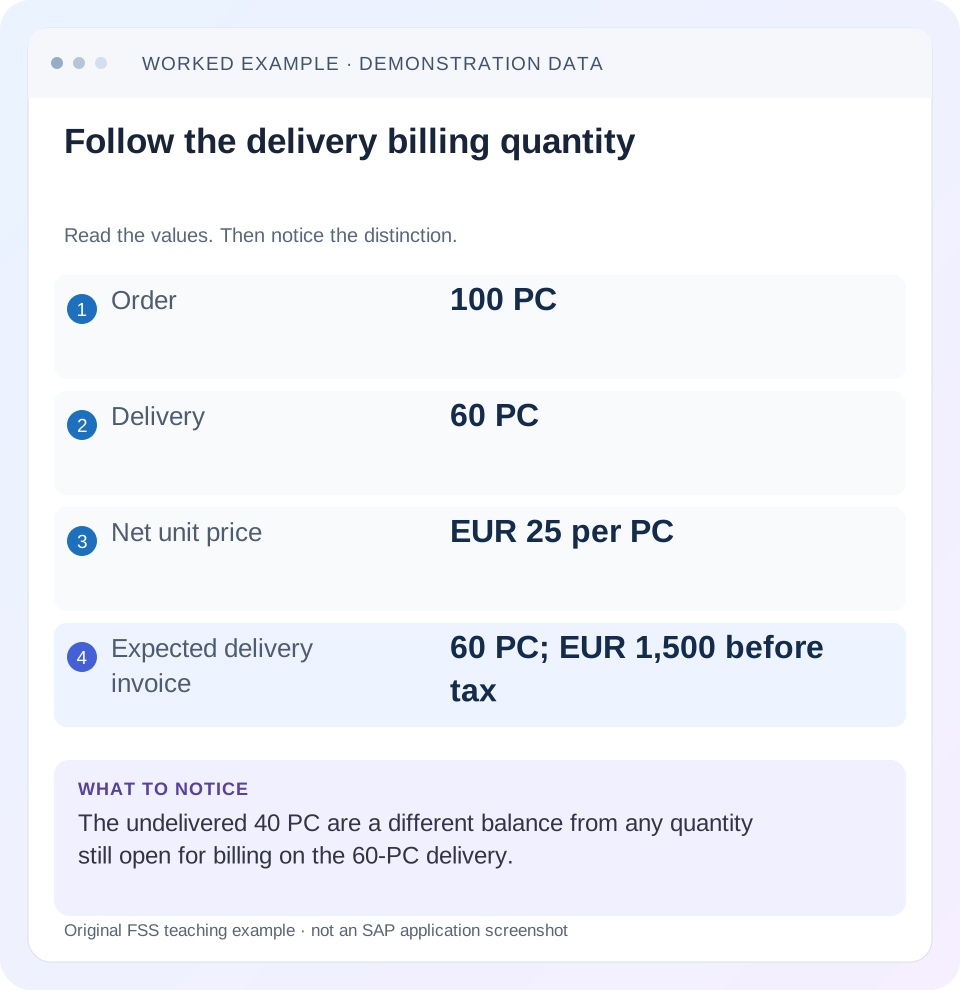
Read the example values
- Order
- 100 PC
- Delivery
- 60 PC
- Net unit price
- EUR 25 per PC
- Expected delivery invoice
- 60 PC; EUR 1,500 before tax
Words you’ll meet in this guide
- Sales order
- A record of a customer’s order.
- Delivery
- A document organizing goods to be sent.
- Billing
- The process that creates a customer charge.
Preview the practical steps
SEE THE CONNECTION
See it in a simple example.
A small example to make the idea concrete.
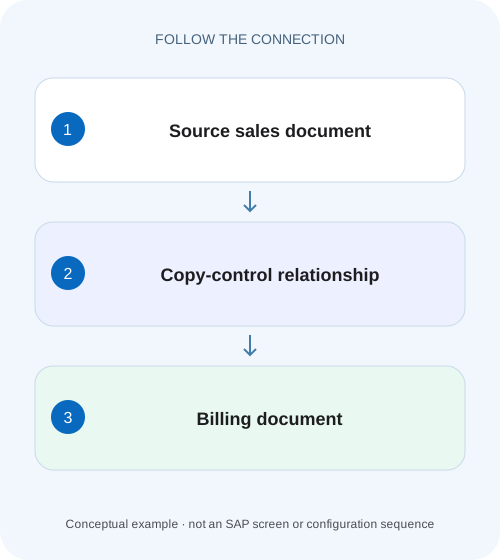
Trace partial equipment delivery into billing
A machinery manufacturer delivered only part of an order and needs to explain the quantity and reference used for billing.
Name the source and target before changing copy control
A billing-reference problem begins with a document relationship: which source document and item should create which target billing document?
Prerequisites and process scope
This tutorial is for SD support analysts and configuration owners with permitted document and configuration display access.
Worked flow: 100 ordered, 60 delivered, 40 still open
In our fictional training order 47000123, item 10 requests 100 PC at EUR 25 net per PC.
Trace partial equipment delivery into billing
A machinery manufacturer delivered only part of an order and needs to explain the quantity and reference used for billing.
Follow the actual source-target document relationship before changing copy control or treating the full order as billable.
| Reader | Business question | Evidence to carry forward |
|---|---|---|
| Equipment and component sales, dispatch and customer-service teams | Trace partial equipment delivery into billing | Follow the actual source-target document relationship before changing copy control or treating the full order as billable. |
01 Name the source and target before changing copy control
A billing-reference problem begins with a document relationship: which source document and item should create which target billing document? Order-related and delivery-related billing use different relationships. “Fix copy control” is incomplete until the source category, document types and item context are established.
SAP describes copying requirements, data-transfer routines and control switches for source-to-target copying. These can determine whether copying is allowed and what data is transferred. They are part of the explanation, not a reason to remove a requirement whenever invoice creation is rejected. [1]
02 Prerequisites and process scope
This tutorial is for SD support analysts and configuration owners with permitted document and configuration display access. Obtain the source order/delivery, item, intended billing type, exact message and document flow. Use an approved training fixture for creation tests; a display investigation can be performed without issuing an invoice.
The example concerns conventional delivery-related customer billing. Billing plans, third-party order-related billing, returns and other processes can use different quantity bases and requirements. SAP-delivered routine numbers or document types in a reference are examples of that release's design, not universal settings to copy into customer-specific types.
03 Worked flow: 100 ordered, 60 delivered, 40 still open
In our fictional training order 47000123, item 10 requests 100 PC at EUR 25 net per PC. Delivery 80000123 covers 60 PC, with the required goods-issue state complete under this process. The remaining 40 PC have not been delivered. The intended invoice should reference the delivery and bill those 60 PC once.
The illustrative net value is 60 × EUR 25 = EUR 1,500 before tax and other conditions. The unshipped 40 PC represent EUR 1,000 at that simple unit price, but that arithmetic does not make them due for this delivery-related invoice. Source quantity and process basis determine the eligible billing population.
| Stage | Quantity | Simple net value |
|---|---|---|
| Order item 10 | 100 PC | EUR 2,500 |
| Delivery 80000123 | 60 PC | EUR 1,500 basis |
| Still undelivered | 40 PC | EUR 1,000 illustration |
| Expected invoice | 60 PC | EUR 1,500 before tax |
04 Read the actual billing relevance first
Inspect the sales item category and its documented billing-relevance behavior. SAP's billing-relevance documentation distinguishes order-based and delivery-based processing and specialized bases. If the item is order-related, searching only delivery-to-billing copy control starts at the wrong relationship. [2]
For the worked case, the intended design is delivery-related billing. Confirm the actual delivery type and delivery item context, target billing type and related sales item. If customer-specific types are used, compare their configured relationship with a working case using the same types. A similar customer or equal invoice amount does not establish equivalent copy-control conditions.
05 Inspect header and item decisions separately
A relationship can contain header-level and item-level controls. A header requirement can reject the whole reference, while an item-specific condition can exclude one item and permit another. Compare the actual rejection message and scope with the relevant control.
If item 10 is excluded while another item invoices, inspect item state and item-level copying logic rather than assuming a missing header relationship. If no source can be referenced for a particular source/target type pair, inspect that pair's existence and requirement. Keep the failed business condition separate from whether the configuration entry exists at all.
06 Follow quantity from source to target
Compare ordered, delivered, goods-issued and already-billed quantities in the same unit. For delivery 80000123, confirm whether a prior invoice already billed some or all of the 60 PC. A source still displayed in document flow is not automatically open for another full invoice.
If 20 PC were already billed in an allowed partial-billing training design, the remaining billing quantity would be 40 PC, not the order's remaining undelivered 40 by coincidence. Those equal numbers represent different balances. Preserve which source item and earlier billing reference produced each balance, and use the actual billing quantity rule for the process.
07 Understand copied pricing versus redetermined pricing
Copy-control pricing behavior can influence which pricing elements carry over and which are redetermined. SAP's support documentation illustrates several pricing-type choices. The correct choice depends on the intended pricing agreement and the actual process; a changed invoice price is not automatically a missing condition record. [1]
For the simple worked value, EUR 25 per PC is an assumption held constant for arithmetic. In a real case, inspect item pricing analysis, condition units, scales, manual conditions and dates. If a quantity change crosses a scale or a pricing date changes, the invoice's unit value can differ intentionally. Review the documented configured behavior before changing a condition or routine.
08 Distinguish requirements from transfer logic
A copying requirement decides whether a condition for copying is satisfied. Transfer logic concerns how data moves or is derived in the target. If the item is rejected because a prerequisite status is incomplete, editing transfer logic may not address the actual barrier. [1]
Conversely, if copying succeeds but a field is wrong, inspect the data source, transfer behavior and later determination rather than deleting requirements. Customer enhancements can also participate. Identify the active routine or extension in the relevant relationship and have its owner review the actual code/configuration against the expected business rule.
09 Troubleshoot with a controlled comparison
Choose a working training source with the same source/target document types, item category and relevant process status. Compare one variable at a time: goods-issue state, billing block, prior billing quantity or required business data. A working invoice for another process is not a useful configuration baseline.
For example, if an otherwise equivalent source with complete goods issue bills and the incomplete source does not, the difference may support a status prerequisite. Confirm the exact message/rule rather than attributing the result solely to timing. If both have the same state but only one fails, inspect item data and active customer logic.
| Observation | Check next |
|---|---|
| Wrong source category expected | Actual item billing relevance |
| Whole type pair rejected | Header relationship and requirement |
| Only one item excluded | Item category/status and item requirement |
| Quantity wrong | Source basis, units and prior billing |
| Price changes on copying | Pricing type, dates, scales and conditions |
| Timeout after create | Existing document flow before retry |
10 Reconcile uncertainty before another create attempt
If the user saw a timeout or an unclear response during billing creation, inspect document flow and existing billing documents before retry. A failed client response does not prove that no invoice was saved. Record any resulting invoice and its status first.
For delivery 80000123, identify the billed quantity across the relevant noncanceled billing chain under the supported process. Do not simply add every displayed document: cancellations and corrections have distinct relationships. The goal is one intended 60-PC billing outcome, not a screen that eventually returns success after several uncontrolled attempts.
11 Plan and verify an approved correction
Define the defect precisely: missing intended type relationship, incorrect requirement, wrong quantity basis or faulty transfer behavior. Correct it in the authorized configuration/development process and test in quality. Include dependencies and transport evidence where applicable.
The positive test should create the expected delivery-reference invoice for 60 PC and EUR 1,500 under the simplified fixture. A negative case with an intentionally unmet prerequisite should remain excluded with the documented controlled response. A boundary case should verify that already-billed quantity is not billed again. Inspect reference links, item quantities and pricing, then accounting-transfer evidence where in scope.
12 Practice the quantity and reference reasoning
On paper, draw order 47000123/10 to delivery 80000123/10 to invoice INV-A/10. Label the order 100 PC, delivery 60 PC and invoice 60 PC. Keep the undelivered 40 PC on the order side. Ask which relationship would be inspected if the invoice's source were the order instead.
Then vary the fixture to a permitted partial invoice of 20 PC, leaving 40 delivery PC for billing. The learner should distinguish that billing balance from the order's undelivered quantity. Finally, change the item to a documented order-related process and explain why the delivery-based assumption must be replaced rather than patched with a copy-control override.
Create a reference worksheet with source document/item, source category, target type, proposed billing quantity, already-billed quantity and expected net value. For the fixture, the delivery contributes 60 PC while the order still requests 100 PC. If the proposed invoice shows 100 PC, pause the creation test and inspect the selected reference and quantity basis; do not explain the discrepancy merely by multiplying a different price.
For a pricing comparison, keep a copy of the source item’s relevant condition values and the target’s resulting values. If the target remains 60 PC but its net value changes, quantity control may be correct while pricing transfer or redetermination differs. That separation lets the SD owner investigate the specific pricing behavior without changing an otherwise valid copy-control quantity rule.
A final quantity boundary uses different units on the source and proposed target. If the delivery represents 6 BOX with 10 PC per box, it describes 60 PC under that approved conversion. A target showing 60 PC may therefore be correct, while 6 PC would underbill the quantity by a factor of 10. Establish the actual conversion and condition/pricing units before changing copying logic. Keep both original quantities and normalized values in the worksheet. This exposes a plausible copied-quantity complaint that arithmetic alone cannot solve until unit semantics are made explicit.
13 Questions and a useful copy-control handoff
Does one copy-control screen govern the entire order-to-cash chain? SAP documents multiple source/target relationships. Does an error prove the relationship is missing? It may exist but reject the source under a requirement. Does a copied invoice prove its quantity and price are correct? Inspect those values and their reference basis.
A useful handoff names source/target categories and types, item category, current statuses, prior billing, failed requirement/message and expected quantity/value. For the illustration: “Delivery-related 60-PC source; no prior invoice established; intended EUR 1,500 net; source/target relationship and item requirement under review.” That is specific enough for the configuration owner to investigate without broad speculative changes.
Related services and next steps
Primary sources
Found this useful?
Share this guide with your network, or leave a like.
Your like is saved in this browser.