SAP Fiori “App could not be opened”: Separate navigation from loading failures
A manufacturing buyer can reach the launchpad but cannot open the operational application needed for component follow-up.

Source review:
START HERE · NO PRIOR TOPIC KNOWLEDGE NEEDED
What it is. Why it matters.
A Fiori application needs a navigation target, available app resources and working service access. A launch failure can arise before the business application has fully loaded.
Completely new to SAP?
Manufacturers use SAP to connect work such as buying components, recording inventory, planning production, shipping equipment and accounting for costs. SAP S/4HANA is an enterprise resource planning system: it connects these activities through shared business data.
SAP Fiori is SAP’s design approach for business applications. SAPUI5 is a user-interface toolkit, and Fiori elements uses metadata to generate common application patterns.
A transaction code, or t-code, is a shortcut to a task in classic SAP GUI. Fiori apps provide another way to work. Names and screens depend on the product and release; you do not need a live system to learn the concepts in this guide.

Scope and source-review notes
Scope and evidence
Source review by FAST SAP SOLUTIONS® editorial. This badge describes our editorial review; it does not represent SAP certification or independent endorsement.
ABAP-based SAP Fiori launchpad navigation/resource/service troubleshooting; Work Zone and other products require their own tools and configuration.
Primary documentation reviewed on 14 November 2026 using official indexed excerpts. Documentation review only; authored examples were not compiled or executed in an SAP system.
A MANUFACTURING EXAMPLE
Locate the failure opening a plant worklist
Find the failed launch stage
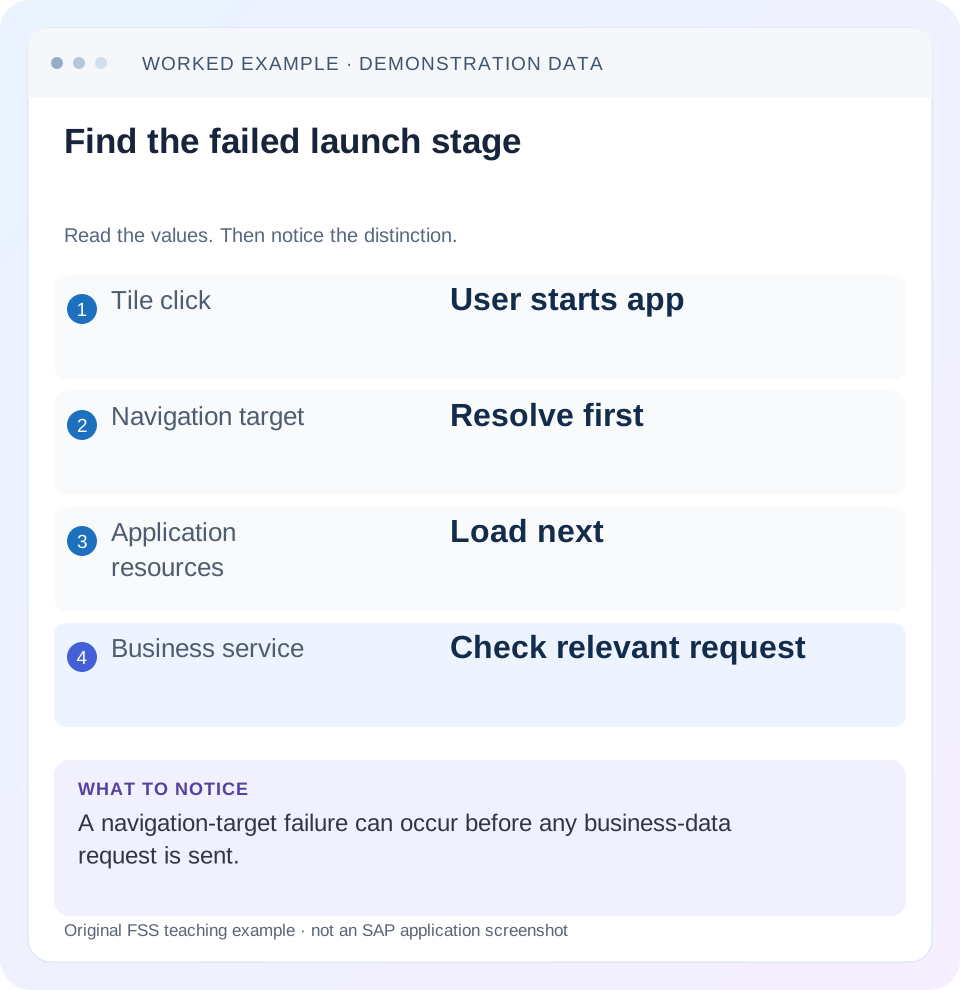
Read the example values
- Tile click
- User starts app
- Navigation target
- Resolve first
- Application resources
- Load next
- Business service
- Check relevant request
Words you’ll meet in this guide
- Binding
- A connection between a screen control and data.
- Metadata
- Information describing data or how it should be used.
- Service
- A software interface that provides data or operations.
- Backend
- The system or service that provides business processing behind the interface.
- ABAP
- SAP’s programming language for business applications.
- OData
- A standard for reading and updating data through a web API.
- Fiori
- SAP’s approach to business application design.
- CSRF
- Cross-Site Request Forgery. A CSRF token helps a service reject unwanted cross-site write requests.
Preview the practical steps
SEE THE CONNECTION
See it in a simple example.
A small example to make the idea concrete.
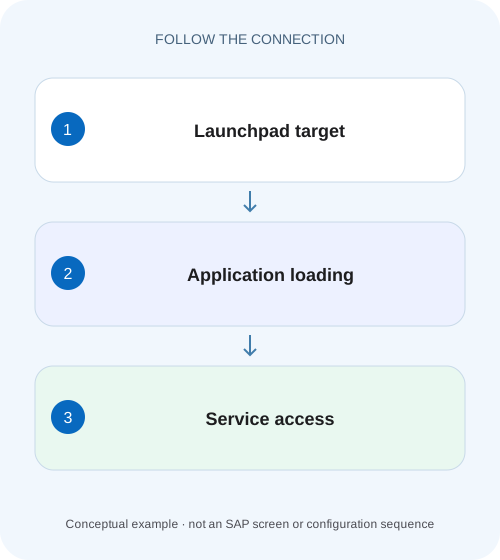
Locate the failure opening a plant worklist
A manufacturing buyer can reach the launchpad but cannot open the operational application needed for component follow-up.
Find the failed launch stage before changing roles or caches
“App could not be opened” can describe an unresolved launchpad intent, failed application-resource loading or a backend service problem encountered during startup.
Scope and prerequisites
The documented tools here apply to ABAP-based SAP Fiori launchpad landscapes.
Understand the launch chain
An intent combines semantic object, action and parameters.
Locate the failure opening a plant worklist
A manufacturing buyer can reach the launchpad but cannot open the operational application needed for component follow-up.
Separate navigation, resource loading and service access with the actual failing request before requesting a broad role change.
| Reader | Business question | Evidence to carry forward |
|---|---|---|
| SAP developers and application teams supporting manufacturers | Locate the failure opening a plant worklist | Separate navigation, resource loading and service access with the actual failing request before requesting a broad role change. |
01 Find the failed launch stage before changing roles or caches
“App could not be opened” can describe an unresolved launchpad intent, failed application-resource loading or a backend service problem encountered during startup. Capture the complete message and failing request. A tile being visible does not prove its target resolves, and a resolved target does not prove the UI5 component or business service works. [1]
This tutorial follows a fictional purchase-request app through navigation, component loading and an OData read. It gives a concrete evidence path for each boundary, including why one missing preload file is not automatically the root cause and why an administrator's successful launch is insufficient verification for the affected business user.
02 Scope and prerequisites
The documented tools here apply to ABAP-based SAP Fiori launchpad landscapes. SAP Build Work Zone and other launchpad products require their own configuration and diagnostics. Record frontend/backend systems, release, app/component ID and the user's intended role. Embedded and hub deployments can route differently.
You need the exact navigation hash, a sanitized browser network/console capture and authorized access to launchpad diagnostic information. Displaying evidence is the starting point; activating services or recalculating shared indexes is a targeted operational correction only when the matching cause is established. No customer application was opened or repaired for this article.
03 Understand the launch chain
An intent combines semantic object, action and parameters. Launchpad resolution selects an applicable target mapping under the user's content/role context. That target supplies the app/component and route. The browser then loads resources and the application requests metadata and business data from its configured service. [1] [2]
Different owners can control each boundary: launchpad content, deployment/resources, routing/destinations and backend service implementation. Keep the first failed boundary explicit so the ticket reaches the right evidence. A business authorization failure after the app loads should not be described as missing target mapping merely because the user started from a tile.
04 Worked case: one app, three distinct failures
Assume fictional intent #PurchaseRequest-display?RequestID=1001 and component demo.requests. In caseA, the user clicks a visible tile but no applicable mapping resolves. In caseB, mapping resolves but the component resource returns 404. In caseC, resources load and the initial OData request returns 500.
All three can leave the user with no working business page, but their next checks differ. CaseA needs intent/assignment evidence. CaseB needs deployment, route and component-resource evidence. CaseC needs the exact service request and Gateway/backend correlation. Treat these as independent branches rather than a sequence of generic fixes applied until something happens.
| Case | Earliest confirmed failure | Useful owner/evidence |
|---|---|---|
| A | Intent cannot resolve | Exact hash, target mapping and user assignment |
| B | demo.requests component 404 | Resolved target, resource URL and deployment |
| C | Initial OData read 500 | Service path/time and matched backend log |
| Success | Permitted request 1001 displayed | Same user, route and expected business data |
05 Capture one launch attempt with enough context
Record user/system, timestamp with timezone, tile/app title, complete hash and exact message. In browser developer tools, preserve the relevant console message and network request sequence for one launch. Remove authorization headers, cookies, CSRF tokens and confidential payloads before sharing.
Note whether navigation changes the hash, whether a component request occurs and whether metadata/business requests follow. Do not send an entire unrelated browsing session when a few correlated requests answer the question. If a log identifier appears in the console, retain it as a bridge to the documented UI2 application log. [1]
Build a short launch timeline rather than collecting unrelated red requests: intent submitted, resolution result, first component request, descriptor/dependency loading, metadata request and first business read. Mark the first stage whose expected output is missing or invalid. In case B, for example, no OData read is expected if component loading has already stopped; searching backend logs for a nonexistent business request adds no evidence.
Compare a direct deep link and the tile only when they request the same intent and parameter set. If one includes RequestID=1001 while the other omits a required parameter or resolves another action, their different behavior does not prove a cache defect. Keep the complete hash and resolved target together. When comparing users, use the intended business assignments in the same system/client and session conditions. An administrator launching a different mapping in another target system is a different experiment, even if the visible tile title matches.
06 For unresolved navigation, inspect intent and user assignment
Use the documented intent-analysis facilities for the affected ABAP launchpad. SAP lists /UI2/FLIA to inspect the target mapping and associated authorization-role context. Compare the exact semantic object, action and relevant parameters rather than relying on a similar tile label. [1]
Check the intended catalog/role assignment for the affected user. Tile and target-mapping content must be coherent, but assigning a broad administrative role is not a substitute for the correct business role. If routing targets another system, inspect the system alias/destination through the supported checks; SAP lists /UI2/FSAC for applicable system-alias diagnostics. [1]
Confirm the actual intent
Copy the hash from the failed navigation and compare its object/action/parameters to the configured target.
Expected observation: The requested target is identified.
Inspect mapping and assignment
Use supported intent analysis for the affected user and launchpad system.
Expected observation: Missing mapping and missing assignment are distinguished.
Check target system routing
Compare the resolved system alias/destination with the expected application host.
Expected observation: The app is not accidentally launched in another system.
Retain the diagnostic reference
Correlate any UI2 log ID with the documented application log.
Expected observation: The resolution finding is reproducible.
07 For resource failures, inspect what the browser actually received
If a component request occurs, record URL, status and response content. A404 can mean an absent/misrouted resource; a200 response containing a login page is not valid JavaScript. Compare the component ID, resource path, application descriptor and deployment in the resolved target system.
SAP's navigation guidance identifies application-index/configuration issues and missing dependencies as possible causes. Inspect relevant application-index logs and declared manifest dependencies before choosing a correction. A404 for a -preload file may fall back to individual sources and primarily affect performance; find the first actual fatal loading error instead of treating every red network row as equally causal. [1]
For a resource-loading failure, inspect the first fatal resource and its initiator. A missing dependent library can prevent component creation even when the app's own Component.js is present. Conversely, a preload miss followed by successful individual module loads can leave the app functional. Record the subsequent requests and final console error before choosing which deployment artifact or dependency needs correction. After remediation, repeat the same launch timeline and verify the first business read, not only that one resource now returns 200.
08 Use service-node and caching corrections only for a demonstrated cause
The support guidance shows how a failing Component.js URL can identify the relevant ABAP UI5 ICF node. In applicable deployments, an inactive node is one possible cause. Confirm the expected node and installation configuration with the responsible owner rather than enabling an entire service tree to make a single app load. [2]
Similarly, stale resources after a deployment can require the supported cache/index procedure, but clearing caches does not create a missing target mapping or install an absent component. Preserve the original resource URL and deployment/index evidence first. After a targeted correction, verify the same request returns the intended resource content and app version.
09 For backend failures, move to the service request boundary
If the application loads but an OData request fails, retain its method, resource path, timestamp and error body. Confirm the service belongs to the intended backend and version. A metadata failure, authorization rejection and server exception have different diagnostics even if the startup screen cannot proceed.
Correlate server-side errors with Gateway and backend logs using the actual request context. Avoid repeating a modifying startup action without checking its previous outcome. For this tutorial, prefer a permitted read of request 1001 as the verification fixture. Do not change UI5 resources to compensate for a server-side business or authorization failure.
10 Troubleshooting decisions
The most useful branch is the earliest one supported by evidence. Later failures can be consequences, so preserve ordering and exact request identities.
| Observation | Question | Next check |
|---|---|---|
| Tile visible; no component request | Intent resolved for this user? | /UI2/FLIA and mapping/role evidence |
| App opens in wrong system | Alias/destination target correct? | Resolved target and supported alias checks |
| Component 404 | Installed/deployed at resolved path? | Resource, descriptor and app-index logs |
| Only preload 404; sources continue | Fallback succeeds? | First fatal console error, if any |
| Resource 200 but parse error | Response actually JavaScript? | Content type/body and authentication route |
| Metadata/business request fails | Service or backend boundary? | Request response and Gateway correlation |
| Admin works; business user fails | Different content/auth context? | Intended user’s complete path |
11 Verify the fix under the intended user context
A positive check launches the same hash as the affected user, loads the intended component and reads permitted request 1001. Verify the page identity and backend system, not merely the absence of the original popup. A negative access check uses an identity without the intended permission and confirms the documented denial without broad new access.
Boundary checks include a deep link with required parameters, a fresh supported session after deployment and another app sharing the changed component or mapping where relevant. Confirm preload fallback or cache behavior only when that was part of the actual issue. These are proposed tests; the article does not claim a reproduced customer fix.
12 Frequently asked questions and useful handoff
Does seeing a tile prove access is complete? No. Target resolution, resource loading and service authorization are separate boundaries.
Should I clear every cache first? Establish a stale-resource cause and use the supported targeted procedure. Cache clearing cannot repair every launch-stage failure.
Is every 404 fatal? No. The documented preload fallback is an example where loading can continue. Inspect the actual sequence and final error.
Why does it work for an administrator? Their assignments and backend permissions may differ. Retest the intended business context.
A useful handoff contains user/system, exact hash, component ID, earliest failed boundary, sanitized request/response, matching log reference and recent content/deployment change. That is enough for a concrete next step without granting broad roles or changing unrelated services.
Related services and next steps
Primary sources
Found this useful?
Share this guide with your network, or leave a like.
Your like is saved in this browser.