SAP ME23N: Use purchase-order history to explain what happened
A machinery buyer needs to explain why a component PO shows receipts, a reversal and a smaller invoiced quantity while assembly still needs the material.

Source review:
START HERE · NO PRIOR TOPIC KNOWLEDGE NEEDED
What it is. Why it matters.
A purchase order records what is ordered from a supplier. ME23N displays it in classic SAP, including item history that connects receipts and invoices to the order.
Completely new to SAP?
Manufacturers use SAP to connect work such as buying components, recording inventory, planning production, shipping equipment and accounting for costs. SAP S/4HANA is an enterprise resource planning system: it connects these activities through shared business data.
Materials Management supports purchasing and inventory. A request, order, goods receipt and supplier invoice describe separate events, each with its own record and status.
A transaction code, or t-code, is a shortcut to a task in classic SAP GUI. Fiori apps provide another way to work. Names and screens depend on the product and release; you do not need a live system to learn the concepts in this guide.

Scope and source-review notes
Scope and evidence
Source review by FAST SAP SOLUTIONS® editorial. This badge describes our editorial review; it does not represent SAP certification or independent endorsement.
ME23N purchase-order display/history in classic ERP and supported S/4HANA scenarios. Available tabs and follow-on documents depend on item and process.
Reviewed linked SAP purchasing-history documentation and available official indexed text on 14 November 2026. The PO, references, quantities and calculations are fictional teaching examples. They were not posted or tested in a customer SAP system. Screen layouts and supported follow-on processes depend on item type, release and configuration.
A MANUFACTURING EXAMPLE
Reconcile an assembly-component PO
Reconcile one PO item
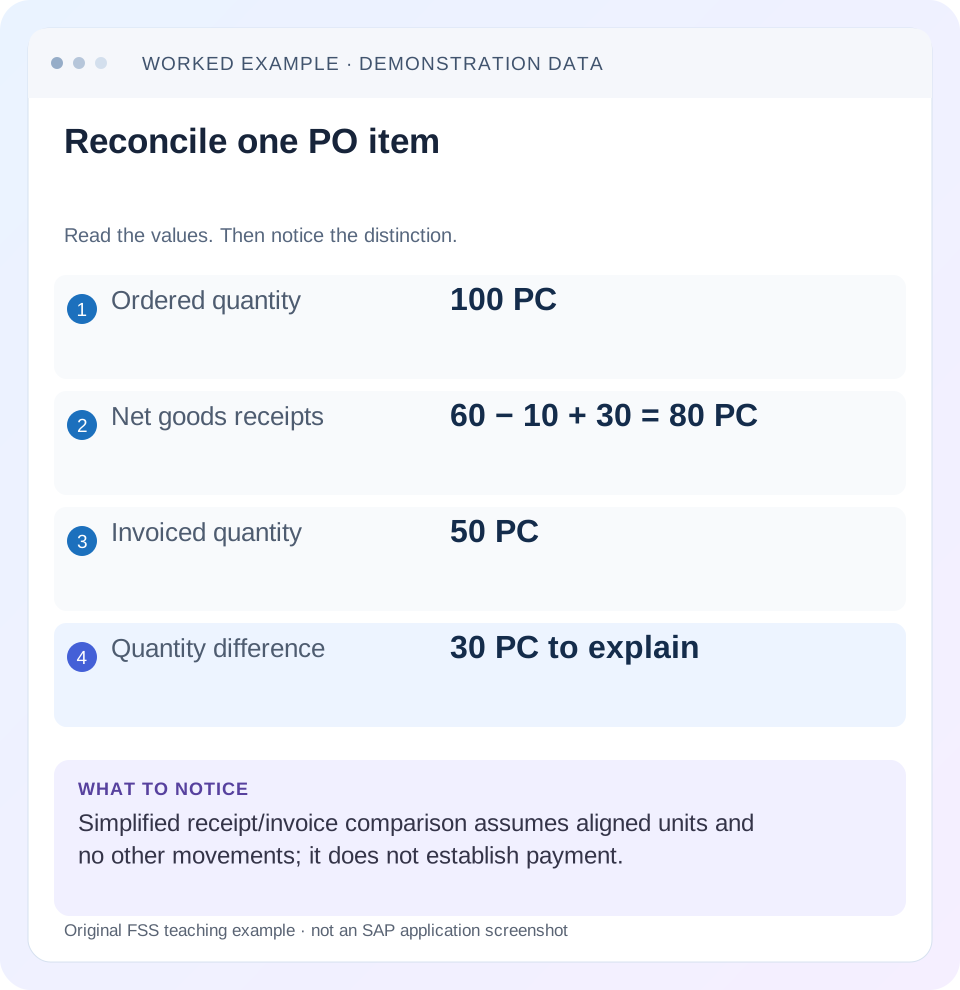
Read the example values
- Ordered quantity
- 100 PC
- Net goods receipts
- 60 − 10 + 30 = 80 PC
- Invoiced quantity
- 50 PC
- Quantity difference
- 30 PC to explain
Words you’ll meet in this guide
- Material
- A product or supply item managed in SAP.
- Plant
- An organizational unit for relevant logistics operations.
- Goods receipt
- A recorded receipt of goods in a business process.
- Purchase order
- A purchasing document requesting goods or services from a supplier or supplying plant.
- Invoice
- A supplier’s bill for goods or services.
- CDS
- Core Data Services: reusable definitions of business data and relationships.
- Fiori
- SAP’s approach to business application design.
- HANA
- SAP’s database platform.
Preview the practical steps
SEE THE CONNECTION
See it in a simple example.
A small example to make the idea concrete.
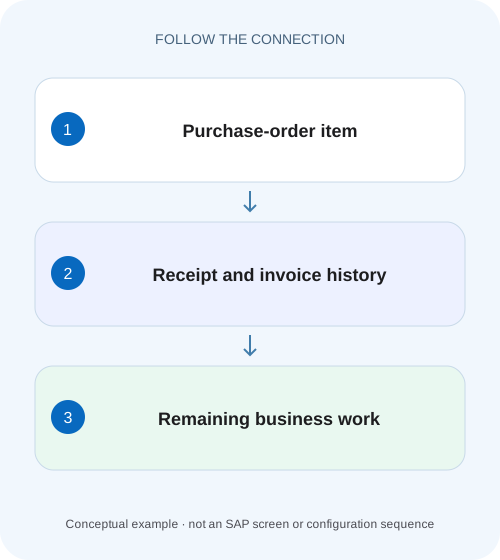
Reconcile an assembly-component PO
A machinery buyer needs to explain why a component PO shows receipts, a reversal and a smaller invoiced quantity while assembly still needs the material.
What purchase-order history can tell you
ME23N is a useful starting point when a buyer, receiving team and accounts-payable team describe the same purchase order differently.
Prerequisites: choose the document, item and display context
Use an authorized purchasing display role in classic ERP or a supported S/4HANA landscape.
Read each row as a business event with a reference
For a receipt entry, retain the material-document number and item, posting date, movement context and quantity.
Reconcile an assembly-component PO
A machinery buyer needs to explain why a component PO shows receipts, a reversal and a smaller invoiced quantity while assembly still needs the material.
Follow one PO item's signed receipt and invoice history; separate the outstanding delivery question from the supplier-payment question.
| Reader | Business question | Evidence to carry forward |
|---|---|---|
| Manufacturing buyers and purchasing managers | Reconcile an assembly-component PO | Follow one PO item's signed receipt and invoice history; separate the outstanding delivery question from the supplier-payment question. |
01 What purchase-order history can tell you
ME23N is a useful starting point when a buyer, receiving team and accounts-payable team describe the same purchase order differently. Work at the purchase-order item, not just the order header. The item history links relevant business events, including goods receipts, invoice receipts and corrections, so you can explain which documents support the reported quantity or value. [5]
Start with a specific question: “For item 10, how much was received after reversals, and what invoice documents remain relevant?” That is more answerable than “Why is this PO wrong?” A supplier email, a delivery notification and a posted receipt are different evidence. History helps connect them, but a summary row does not establish payment or the physical condition of the delivered material.
02 Prerequisites: choose the document, item and display context
Use an authorized purchasing display role in classic ERP or a supported S/4HANA landscape. Identify the PO number, item, supplier, material or service, plant and the question you are investigating. In ME23N, select the relevant item and inspect its purchase-order history where available. The exact tabs, fields and navigation depend on the item category, process and release.
Do not assume every PO item behaves like a standard stock-material purchase. Services, returns, subcontracting and other processes can have different follow-on evidence. If your process uses a Fiori application instead, use its supported document navigation to establish the same item-level relationships. This tutorial teaches the reconciliation method rather than prescribing a universal screen layout.
03 Read each row as a business event with a reference
For a receipt entry, retain the material-document number and item, posting date, movement context and quantity. SAP documents that a goods receipt creates a purchase-order history record carrying purchasing-relevant information such as these references. Open the underlying document through the supported display path when you need its complete context. [4]
For an invoice entry, distinguish the logistics invoice from any follow-on accounting document. A logistics invoice being posted does not prove it is unblocked, cleared or paid. Similarly, a goods receipt is a quantity/event observation; it is not a second invoice that should be added to the invoice total.
Keep document date and posting date separate where the distinction matters to the question. Record when you observed the history if receiving or invoicing is still in progress. Another person looking later can see a different, valid history because a reversal or additional receipt has arrived.
04 Worked example: an order for 100 units with a reversal
Consider fictional PO item 10 for 100 pieces at 10 currency units per piece. Ignore tax, foreign exchange, delivery costs and valuation differences for this quantity exercise. The timeline contains an initial receipt of 60 pieces, a reversal of 10 of those pieces, a later receipt of 30 pieces and an invoice for 50 pieces.
The signed receipt calculation is 60 − 10 + 30 = 80 pieces. In this illustration, 20 pieces of the ordered quantity have not been received. The invoice quantity of 50 is a separate comparison: 80 received and 50 invoiced leaves a 30-piece quantity difference to explain. That difference is not automatically an accounting error or permission to post an additional invoice.
The calculation is deliberately narrow. It assumes these are all relevant movements, the units align and no other process controls alter how an open quantity should be interpreted. A delivery-completed indicator, returns, later corrections or a different item type require their own analysis. Do not present ordered minus net received as a universal operational-status algorithm.
| Event | Illustrative reference | Quantity effect | Interpretation |
|---|---|---|---|
| Goods receipt | GR-A / item 1 | +60 PC | First receipt |
| Partial receipt reversal | REV-A → GR-A | −10 PC | Correction of the first receipt |
| Goods receipt | GR-B / item 1 | +30 PC | Later receipt |
| Supplier invoice | INV-A / item 1 | 50 PC invoiced | Separate invoice quantity; not another receipt |
05 Reconcile the item in a repeatable sequence
Before adding numbers, put every relevant entry into its correct business category. Preserve the link from a correction to its original document; an isolated negative quantity is harder to explain than a documented reversal relationship.
Confirm that all entries belong to this item
Match the PO number and item on the receipt and invoice evidence. Check the supplier and material/service context. A header total that includes item 20 cannot resolve an item-10 discrepancy.
Expected observation: The selected chain concerns one defined PO item.
Separate receipts, reversals and invoices
Record document category, reference, posting date, quantity and unit. Pair a reversal with its original event. Do not combine receipt and invoice quantities into one undifferentiated sum.
Expected observation: The net receipt calculation and invoice comparison can be reconstructed independently.
Align units and value context
Check whether the displayed quantity is in order, base or price-unit context. Where a conversion applies, record its actual maintained relationship before comparing. For amounts, retain currency and the relevant value basis.
Expected observation: Every compared quantity or amount has a stated basis.
State the unresolved question
For the example, report 80 PC net received and 50 PC invoiced, then identify which receiving or invoice references need explanation. Distinguish an expected future invoice from a missing posting or a unit mismatch.
Expected observation: The next action follows a specific unexplained document or business event.
06 Why receipt and invoice quantities can differ
A supplier can invoice part of a delivered quantity, the next invoice may not yet be entered, or a receipt can have been reversed after an invoice was posted. These possibilities need evidence; the difference alone does not identify which one occurred. Inspect the actual invoice, correction and reference chain.
Where goods-receipt-based invoice verification applies, the relevant receipt relationship matters to invoice matching. Check the actual PO item setting and supported process before assuming an invoice is simply matched to the whole order. A receipt-based scenario and an order-based comparison are not interchangeable investigation models.
Quantity agreement also does not guarantee value agreement. Price units, invoice conditions, taxes, exchange rates and delivery costs can introduce separate value questions. Establish the quantity chain first, then reconcile amounts in the applicable accounting context. Avoid changing a material price to resolve what is actually an incorrectly interpreted invoice reference.
07 Troubleshooting: choose the branch supported by the history
A good support investigation ends each branch with a specific check. Do not create a new receipt, invoice or reversal merely to make the displayed totals look familiar. First establish whether the underlying event is missing, corrected, represented in another unit or simply not yet due.
| Observation | Question | Next useful evidence |
|---|---|---|
| Supplier says delivered; no receipt entry | Was a supported receipt actually posted for this item? | Receiving reference, material document and PO item. |
| Receipt total seems too high | Were corrections/reversals counted with the correct relationship? | Original and reversing documents, not only positive entries. |
| Quantities differ by a fixed factor | Are order, base and price units mixed? | The actual unit conversion and quantity fields. |
| Invoice exists but supplier is unpaid | Is the issue in invoice, accounting or payment processing? | Accounting reference, block/clearing/payment evidence. |
| Portal and backend disagree | Does the backend history already contain the discrepancy? | ME23N item history and the integration reference/timestamp. |
| Item looks delivered but a balance remains | Are you mixing operational completion and reconciliation? | Item indicators plus receipt/invoice and accounting context. |
08 Follow the invoice into accounting without confusing the states
When the business question concerns payment, capture the logistics-invoice reference and use the supported invoice/accounting display to trace the follow-on document. Establish posting status, payment-block context and the relevant supplier open-item evidence with accounts payable. A PO-history invoice entry is not a payment confirmation.
When the question concerns GR/IR, reconcile the relevant receipt and invoice relationships rather than clearing a balance based on a header-level impression. GR/IR valuation can involve price and other accounting factors beyond the simple quantity exercise. Keep the explanation tied to the item and documents, then use the separate GR/IR guide for the financial reconciliation.
The same discipline applies to reversals. A reversal changes the supported document chain; it does not erase the fact that the original event happened. Retain both references in the investigation so later reviewers can understand the sequence.
09 Practice exercise and expected observations
Rebuild the fictional timeline in a spreadsheet or a small training worksheet. Give receipts and invoice quantities separate columns. Preserve the reversal reference and calculate net receipts using signed effects. Then introduce one deliberate variation at a time so the cause of a changed result is clear.
These are proposed learning checks, not instructions to post documents in production. If you have an authorized training system, use the supported training process and observe the actual labels and document relationships there. Keep the illustration’s simplified arithmetic separate from configuration-specific operational statuses.
| Variation | Expected observation | Lesson |
|---|---|---|
| Remove the second receipt | Net received becomes 50 PC | Only actual receipt events enter that receipt calculation. |
| Remove the reversal | Net received becomes 90 PC | Corrections materially change the net quantity. |
| Increase invoice quantity to 80 PC | Illustrative quantities align | Quantity alignment alone does not establish payment. |
| Move INV-A to another PO item | It no longer explains item 10 | Item identity comes before aggregation. |
| Express one entry in another unit | Raw numbers are not yet comparable | Establish conversion before calculating a difference. |
10 Write a useful resolution or handover
A clear result for this example reads: “At the observation time, item 10 has net receipts of 80 PC, consisting of GR-A 60, REV-A −10 and GR-B 30. INV-A covers 50 PC. The remaining 30-PC receipt/invoice difference is under invoice review; payment has not been established from PO history.” Each statement has a defined limit and a supporting reference.
For a real incident, replace the fictional labels with appropriately protected document references and the actual units. Record the expected business event, observed history and owner of the unresolved step. After an approved correction, revisit the same chain; a changed summary status is not a substitute for checking the resulting documents.
11 Frequently asked questions
Why is purchase-order history empty? First check that the correct item is selected and that the process has relevant posted follow-on events. A PO existing is not proof of a receipt or invoice. Then verify display scope, item type and any integration-specific history path.
Does an invoice in history mean the supplier was paid? No. Trace the relevant accounting and payment evidence. An invoice can be posted while still open or subject to a block; payment is a separate state.
Can I add every positive history amount to calculate receipts? No. Separate business categories and retain reversal/return relationships. Adding invoices and receipts together mixes different events, and ignoring corrections can overstate the received quantity.
Can the same method be automated? SAP documents a purchase-order-history CDS view for supported use cases. Before building an extract, check the view’s supported capabilities, release and authorization scope in your landscape. An extract still needs correct unit, category and reversal interpretation; exporting rows does not perform that reasoning for you. [5]
Related services and next steps
Primary sources
- General Display Functions in Purchasing (MM-PUR) | SAP Help Portal
- Purchase Order – Single-Screen Transaction (ME21N, ME22N, and ME23N) | SAP Help Portal
- Gathering backend history data for Confirmation or Invoice | SAP Help Portal
- SAP Help: Displaying the Purchase Order History
- SAP Help: Purchase Order History — I_PurchaseOrderHistoryAPI01
Found this useful?
Share this guide with your network, or leave a like.
Your like is saved in this browser.